
1. Scenario Animation
Press "Next" to step through it. This lesson starts with the three Switches from Story 7. They used STP (Spanning Tree Protocol) to break the loop: S1 is the Root Bridge, and S3's Port towards S2 is Blocked.
Prologue: A Quick Recap
Step 1 of 9
The three Switches' tree
Remember Story 7? Three Switches were connected in a ring. STP (Spanning Tree Protocol) chose S1 as the Root Bridge and paused forwarding on S3's Port towards S2, and the loop was broken.
Animation text version (all steps)
- Prologue: A Quick Recap
- The three Switches' tree · Octo: Remember Story 7? Three Switches were connected in a ring. STP (Spanning Tree Protocol) chose S1 as the Root Bridge and paused forwarding on S3's Port towards S2, and the loop was broken.
- Full details: Network Story 7, "Octo's Broadcast Storm: Spanning Tree Protocol"
- It was really a lottery · Octo: But why did S1 win? All three Switches have the default priority of 32768, plus VLAN 10, so all of them are 32778. In the end it came down to the MAC Address, and S1's
…:A1just happened to be the lowest. It was really a lottery! - Act 1: A New Friend in the Living Room
- An extra Switch in the wall socket · Mac: My cousin brought an old Switch and casually plugged it into the living-room wall socket, which is S2's Gi0/5. It used to be a core Switch at his office, and its priority was lowered to 4096 long ago.
- "My Bridge ID is the lowest!" · Octo: As soon as S4 is connected, it sends out BPDUs (Bridge Protocol Data Units): its Bridge ID is 4096 + 10 = 4106. The three of us check, and 32778 is bigger than 4106. We really did lose.
- The root moves to the living room · Octo: The whole tree is recalculated around S4: S2's Root Port becomes Gi0/5, S1 has to go through S2 to reach the root, and S3's link to S1 becomes the backup instead.
- The long way round · Pip: I'm leaving from the study's Access Point, heading for the home Router on S1's side. I used to get there in one hop via S3 → S1, but now I have to detour through S2 in the living room! And the moment S4 is unplugged, the whole house has to recalculate all over again.
- Act 2: Fixing the Network
- BPDU Guard shuts the door · Octo: A wall socket should only ever connect a computer. Turn on BPDU Guard on S2's Gi0/5: the moment this Port receives a BPDU, it immediately becomes err-disabled (error-disabled).
- Choosing the root officially · Octo: Next, use
root primaryto set S1's priority to 24576, androot secondaryto set S2 to 28672. From now on, we decide who the root is. No more lotteries. - PortFast: plug in and go · Mac: Finally, turn on PortFast for the Ports that connect me and the TV. Now I can get online almost as soon as I boot up, instead of waiting about 30 seconds.
2. Mission Briefing
What happened?
Mac's cousin brought along an old Switch. We'll call it S4. He casually plugged it into the wall network socket in the living room. S4 used to be a core Switch at his office, so its priority was lowered to 4096 long ago. The Port behind that socket also belongs to VLAN (Virtual LAN) 10, the family zone.
As soon as S4 is connected, it keeps sending BPDUs (Bridge Protocol Data Units) that announce "My Bridge ID is the lowest!" The other Switches check, agree, and so:
- S4 becomes the new Root Bridge.
- The whole house's "tree" is recalculated around S4. Even traffic leaving S1 now has to detour through the living room.
- Whenever S4 is switched off or unplugged, the whole house has to recalculate again, and the network keeps dropping in and out.
In Story 7, S1 became the Root Bridge purely by "drawing lots": everyone had the default priority of 32768, and S1 just happened to have the lowest MAC Address. Any Switch that plugs in with a lower MAC Address, or a lower priority, can steal the root of the tree.
Topology
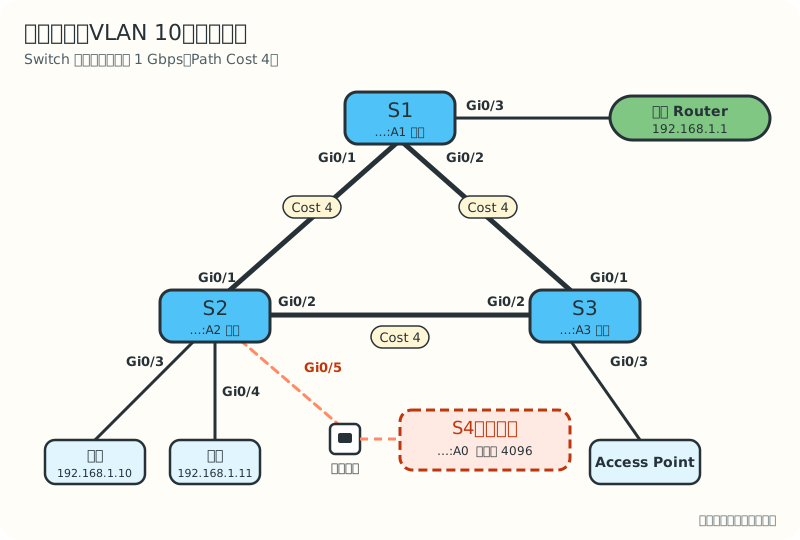
| Switch | MAC Address | Cisco format | Original priority | Port |
|---|---|---|---|---|
| S1 (core) | 00:00:5E:00:53:A1 |
0000.5e00.53a1 |
32768 | Gi0/1 → S2, Gi0/2 → S3, Gi0/3 → home Router |
| S2 (living room) | 00:00:5E:00:53:A2 |
0000.5e00.53a2 |
32768 | Gi0/1 → S1, Gi0/2 → S3, Gi0/3 → Mac, Gi0/4 → TV, Gi0/5 → wall socket |
| S3 (study) | 00:00:5E:00:53:A3 |
0000.5e00.53a3 |
32768 | Gi0/1 → S1, Gi0/2 → S2, Gi0/3 → Access Point |
| S4 (rogue) | 00:00:5E:00:53:A0 |
0000.5e00.53a0 |
4096 | connected to S2's Gi0/5 |
Cisco devices write a MAC Address as three groups of four hexadecimal digits, separated by dots. 00:00:5E:00:53:A1 and 0000.5e00.53a1 are the same address, just written differently.
"Gi0/1" is short for GigabitEthernet0/1, the first 1 Gbps Port. Every cable between the Switches is 1 Gbps, with a Path Cost of 4. A Path Cost is the "distance" STP assigns to a link. To keep things simple, this lesson treats each Switch-to-Switch connection as a single cable; in the next lesson we bundle the S1–S3 connection into two cables.
Goals for this lesson
- Read the output of
show spanning-treeto find the Root Bridge and the role of every Port. - Use BPDU Guard to protect the Ports that connect end devices and stop rogue Switches.
- Officially make S1 the Root Bridge and S2 the backup, instead of leaving it to a MAC Address "lottery".
- Use PortFast so a computer can get online the moment its cable is plugged in.
3. How It Works
What a Bridge ID really looks like
The story said a Bridge ID = priority + MAC Address. On today's Switches, it is actually 8 bytes (64 bits) long:
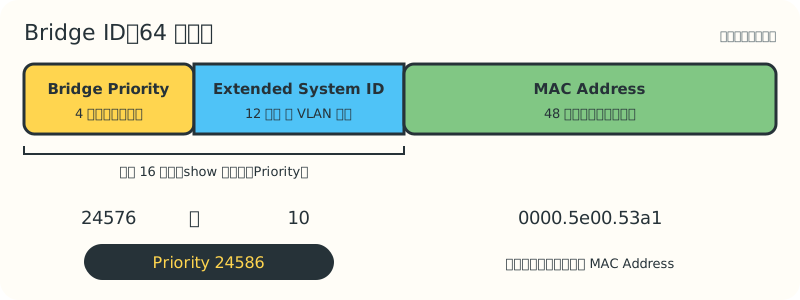
- The Bridge Priority has only 4 bits left, so it can only be set in multiples of 4096: 0, 4096, 8192 ... 61440, giving 16 choices.
- The Extended System ID takes up 12 bits and is filled in automatically with the VLAN number. This design comes from IEEE 802.1t, and it gives every VLAN its own Bridge ID.
So in VLAN 10, the priority part of the default Bridge ID is 32768 + 10 = 32778. That is why you see "strange" numbers like 32778 and 24586 in show output.
The STP family: who's who?
| Name | Standard | Number of trees | Recovery speed |
|---|---|---|---|
| STP | IEEE 802.1D | One for the whole network | 30 to 50 seconds |
| PVST+ (Per-VLAN Spanning Tree Plus) | Cisco proprietary | One per VLAN | 30 to 50 seconds |
| RSTP (Rapid Spanning Tree Protocol) | IEEE 802.1w (2001), later merged into 802.1D-2004 | One for the whole network | Usually within a few seconds |
| Rapid PVST+ | Cisco proprietary | One RSTP tree per VLAN | Usually within a few seconds |
| MST (Multiple Spanning Tree) | IEEE 802.1s, later merged into 802.1Q | Several VLANs share a tree; you choose how many trees | Usually within a few seconds |
"One tree per VLAN" has an advantage: VLAN 10 can use S1 as its root while VLAN 20 uses S2, so the two uplinks each carry part of the traffic. The cost is that the more VLANs you have, the more trees the Switch has to calculate. This lesson uses Rapid PVST+, the most common choice on Cisco Switches, and looks only at the VLAN 10 tree.
RSTP Port Roles
The story's Blocked Port is split into finer roles in RSTP:
| Role | Shown in show as |
Meaning |
|---|---|---|
| Root Port | Root |
The Port closest to the Root Bridge; every non-root Switch has exactly one |
| Designated Port | Desg |
The end of each cable that is responsible for forwarding |
| Alternate Port | Altn |
A backup path to the Root Bridge; if the Root Port fails, it can take over immediately |
| Backup Port | Back |
A backup used when one Switch has two Ports on the same segment; rare today |
RSTP Port States
Classic STP has five states. RSTP simplifies them to three:
| RSTP state | Matching classic states | Learns MAC Addresses? | Forwards Frames? |
|---|---|---|---|
| Discarding | Disabled, Blocking, Listening | No | No |
| Learning | Learning | Yes | No |
| Forwarding | Forwarding | Yes | Yes |
Under Rapid PVST+, Cisco's show spanning-tree still writes Discarding as BLK, so don't be surprised when you see Altn BLK.
Why is RSTP fast?
- Every Switch sends its own BPDUs, once every 2 seconds (the Hello Time). If it misses 3 BPDUs in a row from a neighbour (about 6 seconds), it treats that neighbour as gone. If the cable is physically unplugged, it knows immediately.
- The Alternate Port is already standing by. The moment the Root Port fails, the Alternate Port is promoted to the new Root Port, with no need to listen and learn all over again.
- The Proposal/Agreement handshake. On a Point-to-Point link, the two Switches confirm directly with each other: "Is your side safe?" Once confirmed, the Port starts forwarding straight away, without waiting for timers.
Edge Ports and PortFast
A Port that connects a computer, TV or printer is called an Edge Port, because there will never be another Switch beyond it. The problem: a computer never answers a Proposal, so the Switch has to wait it out, moving from Discarding through Learning to Forwarding, about 30 seconds in total. When Mac's computer boots, DHCP (Dynamic Host Configuration Protocol) may lose patience and time out, so the computer fails to get an IP Address.
Turning on PortFast on a Cisco Switch is how you tell the Switch: "This is an Edge Port." It has two effects:
- The moment a cable is plugged in, the Port goes straight to Forwarding.
- When this Port goes up or down, it does not trigger a Topology Change. Otherwise, every time someone turned a computer on or off, every Switch in the network would have to clear part of its MAC Address Table and go back to Flooding.
Protecting STP: the Guards and the Filter
PortFast has a danger: if someone connects a Switch to an Edge Port, the Port still forwards immediately. That can briefly create a loop, or even let a Switch steal the root, just like S4. So it should be paired with protection features:
| Feature | Where it goes | What it does when a BPDU arrives | How it recovers |
|---|---|---|---|
| BPDU Guard | Edge Ports that connect end devices | Immediately puts the Port into err-disabled (error-disabled), shutting it down completely | Manual shutdown/no shutdown, or configured automatic recovery |
| Root Guard | Designated Ports that connect downstream Switches, where the root should never be | Only when it receives a "superior" BPDU (an attempt to steal the root), puts the Port into root-inconsistent and stops forwarding | Recovers automatically once the other side stops sending superior BPDUs |
| Loop Guard | Root Ports and Alternate Ports | If BPDUs suddenly stop arriving (for example, a one-way cable fault), it does not rush into forwarding; it goes loop-inconsistent instead | Recovers automatically when BPDUs arrive again |
| BPDU Filter | Rarely used | Stops sending and receiving BPDUs | — |
BPDU Filter makes a Port "deaf and mute" to STP. Used in the wrong place, it can create a real loop. The CCNA expects you to know it, but be very careful with it in real work.
The rogue Switch in this lesson is connected to an Edge Port, so BPDU Guard is the best fit.
Two sets of Path Cost values
| Link speed | Short (802.1D-1998) | Long (802.1t) |
|---|---|---|
| 100 Mbps | 19 | 200 000 |
| 1 Gbps | 4 | 20 000 |
| 10 Gbps | 2 | 2 000 |
| 100 Gbps | — | 200 |
Many Cisco Switches use Short by default, but some newer models default to Long. Every Switch in the same network must use the same set; otherwise they will disagree about what is "near" and what is "far". This lesson always uses Short: 1 Gbps = 4.
4. Configuration Steps
The commands below use Cisco IOS as the example. Other vendors (such as Juniper, Aruba and Huawei) use different syntax, but you configure the same things: the Root Bridge, Edge Ports and BPDU protection.
Step 1: Run Rapid PVST+ on all three Switches
S1# configure terminal
S1(config)# spanning-tree mode rapid-pvst      ! Already the default on many newer models
S1(config)# end
Do the same on S2 and S3. If the modes don't match, Rapid PVST+ can still talk to classic PVST+, but that part of the network falls back to the old, slow behaviour.
Step 2: Turn on BPDU Guard on the Edge Port
Deal with the rogue Switch first. Turn on BPDU Guard on S2's wall-socket Port:
S2# configure terminal
S2(config)# interface gi0/5
S2(config-if)# spanning-tree bpduguard enable
%SPANTREE-2-BLOCK_BPDUGUARD: Received BPDU on port GigabitEthernet0/5 with BPDU Guard enabled. Disabling port.
%PM-4-ERR_DISABLE: bpduguard error detected on Gi0/5, putting Gi0/5 in err-disable state
S4 is still plugged in, so as soon as its next BPDU arrives, the Port is shut down. That is exactly what we want.
Step 3: Officially choose the Root Bridge and its backup
S1(config)# spanning-tree vlan 10 root primary      ! Usually sets 24576
S2(config)# spanning-tree vlan 10 root secondary    ! Sets 28672
root primary and root secondary are Cisco "macro" commands. They simply calculate a priority and write it for you. In show running-config, what you will actually see is:
spanning-tree vlan 10 priority 24576
You can also type spanning-tree vlan 10 priority 24576 directly. The effect is the same, and the value is more predictable.
Step 4: Turn on PortFast for the other Edge Ports
S2(config)# interface range gi0/3 - 4
S2(config-if-range)# spanning-tree portfast
%Warning: portfast should only be enabled on ports connected to a single
 host. Connecting hubs, concentrators, switches, bridges, etc... to this
 interface  when portfast is enabled, can cause temporary bridging loops.
 Use with CAUTION
The Switch prints a warning to remind you that this Port should connect only a single end device.
The shortcut: BPDU Guard on every PortFast Port automatically
S2(config)# spanning-tree portfast bpduguard default
This one line turns on BPDU Guard automatically for every Port with PortFast enabled, so you don't have to configure each Port separately. Many companies make it part of their standard configuration.
5. Verification
Before the fix: the world as S1 sees it
S1# show spanning-tree vlan 10

VLAN0010
  Spanning tree enabled protocol rstp
  Root ID    Priority    4106
             Address     0000.5e00.53a0
             Cost        8
             Port        1 (GigabitEthernet0/1)
             Hello Time   2 sec  Max Age 20 sec  Forward Delay 15 sec

  Bridge ID  Priority    32778  (priority 32768 sys-id-ext 10)
             Address     0000.5e00.53a1
How to read it:
protocol rstp: this tree is calculated with RSTP, i.e. Rapid PVST+.- Root ID is "who I think the root is"; Bridge ID is "me". They differ, so S1 is not the root.
- The root's priority is 4106 = 4096 + VLAN 10, with address
0000.5e00.53a0. That's the rogue S4. - Cost 8: getting from S1 to the root crosses two 1 Gbps cables (4 + 4).
- Port 1: S1's Root Port is Gi0/1, the cable towards S2.
After the fix: S1 becomes the root
S1# show spanning-tree vlan 10

VLAN0010
  Spanning tree enabled protocol rstp
  Root ID    Priority    24586
             Address     0000.5e00.53a1
             This bridge is the root
             Hello Time   2 sec  Max Age 20 sec  Forward Delay 15 sec

  Bridge ID  Priority    24586  (priority 24576 sys-id-ext 10)
             Address     0000.5e00.53a1
             Hello Time   2 sec  Max Age 20 sec  Forward Delay 15 sec
             Aging Time  300 sec

Interface           Role Sts Cost      Prio.Nbr Type
------------------- ---- --- --------- -------- --------------------------------
Gi0/1               Desg FWD 4         128.1    P2p
Gi0/2               Desg FWD 4         128.2    P2p
Gi0/3               Desg FWD 4         128.3    P2p
Every Port on the Root Bridge is Desg FWD.
S3: find the Alternate Port
S3# show spanning-tree vlan 10
(top half omitted)
Interface           Role Sts Cost      Prio.Nbr Type
------------------- ---- --- --------- -------- --------------------------------
Gi0/1               Root FWD 4         128.1    P2p
Gi0/2               Altn BLK 4         128.2    P2p
Gi0/3               Desg FWD 4         128.3    P2p
What each column means:
| Column | Meaning |
|---|---|
| Role | Port Role: Root, Desg, Altn, Back |
| Sts | State: FWD (Forwarding), BLK (Discarding), LRN (Learning) |
| Cost | This Port's own Path Cost |
| Prio.Nbr | Port Priority (default 128) and the Port number, used as a tie-breaker |
| Type | P2p is Point-to-Point; Edge means PortFast is on; Shr is Shared (half duplex, e.g. connected to a Hub) |
S3's Gi0/2 towards S2 is Altn BLK. S2 and S3 have the same cost to the root (4 each), but S2's Bridge ID (28682) is lower than S3's (32778), so S2's end wins the Designated Port.
S2: check the Edge Ports and err-disabled
S2# show spanning-tree vlan 10
(top half omitted)
Gi0/1               Root FWD 4         128.1    P2p
Gi0/2               Desg FWD 4         128.2    P2p
Gi0/3               Desg FWD 4         128.3    P2p Edge
Gi0/4               Desg FWD 4         128.4    P2p Edge

S2# show interfaces status
Port      Name               Status       Vlan       Duplex  Speed Type
Gi0/3     amai-pc            connected    10         a-full  a-1000 10/100/1000BaseTX
Gi0/5     living-room-wall   err-disabled 10         auto    auto   10/100/1000BaseTX
Gi0/5 no longer appears in the STP table because it has been shut down; show interfaces status shows it as err-disabled.
6. CLI Lab
Your turn! Below is a simulated terminal. You control S1, S2 and S3, and the rogue S4 is already plugged in in the living room. The simulator really calculates the result from Bridge IDs and Path Costs, so if you configure things in a different order, you'll see the matching changes, including common mistakes.
CLI Lab
Evict the Rogue Root Bridge
S4 is already plugged into the living-room wall socket and has stolen the Root Bridge role. Log in to S1, S2 and S3 and work through the task list to fix the whole network.
Type a command and press Enter. Short forms work (for example sh span vl 10), ? lists the available commands, and ↑ / ↓ scroll through your recent commands.
7. Troubleshooting
| Symptom | Likely cause | Command to check | Fix |
|---|---|---|---|
| The Root Bridge is not the Switch you wanted | No priority was configured, or a Switch with a lower priority was plugged in | show spanning-tree vlan 10, check the Root ID Address |
Choose the root with root primary or priority; turn on BPDU Guard on Edge Ports |
| A computer takes about 30 seconds to get online after being plugged in | PortFast is not on for the Edge Port | show spanning-tree, no Edge in the Type column |
spanning-tree portfast |
| A Port suddenly "dies" and its light goes out | BPDU Guard detected a BPDU and the Port went err-disabled | show interfaces status, show logging |
First find and unplug the wrongly connected Switch, then shutdown, no shutdown |
After root primary, the priority ends up as 20480, 16384 or even 0 |
A Switch with a priority below 24576 was already the root, so the macro set a value 4096 lower than it | show running-config, show spanning-tree |
Deal with that Switch first, then write a fixed value with priority |
| You set a priority of 25000 and the Switch rejects it | The priority must be a multiple of 4096 | Read the error message | Use a value such as 24576 or 28672 |
| An uplink between Switches gets shut down | BPDU Guard was turned on for a Port that connects one of your own Switches | show interfaces status |
Remove BPDU Guard from that Port, then re-enable the Port |
Letting err-disabled recover automatically
If you don't want to restart the Port by hand every time, you can set up automatic recovery:
S2(config)# errdisable recovery cause bpduguard
S2(config)# errdisable recovery interval 300      ! Seconds; the default is also 300
But if the rogue Switch is still plugged in, the Port comes back every 5 minutes and is immediately shut down again. Automatic recovery is just a convenience; finding the source is the real fix.
8. Common Misconceptions
- "STP will automatically pick the newest, fastest Switch as the Root Bridge." No. STP compares only Bridge IDs and completely ignores the Switch's model and speed. If you don't set a priority, the root may end up on an old Switch in a corner.
- "BPDU Guard pauses the Port for a while and then recovers by itself." Not by default. An err-disabled Port stays shut down until an administrator deals with it, or until
errdisable recoveryis configured. Root Guard and Loop Guard are the ones that recover automatically. - "PortFast turns off STP on that Port." No. PortFast only skips the waiting. The Port still sends BPDUs and still processes the BPDUs it receives. On a Cisco Switch, an Edge Port that receives a BPDU loses its Edge status and becomes a normal Port again, which is why BPDU Guard is needed as a second line of defence.
- "
root primaryalways sets 24576." Not always. If the current root is already below 24576, it sets an even lower value; see Troubleshooting. - "An
Altn BLKPort does nothing." It doesn't forward normal Frames, but it keeps receiving BPDUs, ready to take over from the Root Port at any moment. - The animation and the Lab simplify the timing. In a real network, BPDU Guard usually shuts the Port down within a second or two. RSTP also recalculates quickly, but it varies with the model and the size of the network.
9. Quiz
10. Key Notes
- The priority part of a Bridge ID = Bridge Priority (a multiple of 4096) + Extended System ID (the VLAN number), so the default for VLAN 10 is 32778.
- Rapid PVST+ means "one RSTP tree per VLAN". RSTP Port Roles are Root, Designated, Alternate and Backup, and there are only three states: Discarding, Learning and Forwarding.
- Always choose the Root Bridge on purpose (
root primary/secondaryorpriority); don't leave it to a MAC Address "lottery". - Turn on PortFast for Ports that connect end devices, and pair it with BPDU Guard. A Port that receives a BPDU becomes err-disabled; find the source before re-enabling it.
- Reading
show spanning-tree: first compare the Root ID with the Bridge ID, then check each Port's Role, Sts and Type.
Next Stop
There is only one cable between S1 and S3, and S3's backup cable to S2 just sits idle most of the time. In the next lesson, Octo bundles two cables into one logical link, and STP treats them as a single Port: .