
1. Comic Opening
Comic text version (scenes and dialogue)
| Panel | Scene | Dialogue |
|---|---|---|
| 1 | Mac looks worried on the left. On the right is a globe with a phone friend on the far side. Between them are only a broken dotted line and a question mark. | Mac: "I want to send a photo to my friend on the other side of the world... but there's nothing connecting us!" |
| 2 | Pip stands on a cable that joins Mac and a tablet. The devices are labelled Node and the cable is labelled Link. | Pip: "Don't worry! Connect the devices together and you've got a Network!" |
| 3 | Inside the house, Mac, a phone and a tablet are joined by cables, and Pip walks along them. | Caption: "A network in a home or a school is called a LAN (Local Area Network)." Pip: "Inside a LAN, I get anywhere in just a few steps!" |
| 4 | On the map, several LANs are joined by roads. Pip dashes along the road, delivering the photo to the faraway phone friend. | Caption: "A large network that stretches between cities and countries is called a WAN (Wide Area Network)." Mac: "One network after another... so that's what the Internet is!" |
2. Key Idea
Imagine a class of students passing notes to one another. Each student is a Node, and the route a note travels is a Link.
A Network is two or more devices that are connected and can exchange data. A small one, such as a home or a school, is called a LAN (Local Area Network). One that stretches across cities and countries is called a WAN (Wide Area Network). Join countless networks all over the world together and you get the Internet.
3. A Closer Look
What counts as a Node?
Any device on a network that sends or receives data is a Node. They fall roughly into three groups:
- Devices we use every day: phones, computers, tablets, smart TVs, game consoles.
- Network equipment that helps pass data along: for example a Router and a Switch. A Router sends data on to other networks, while a Switch delivers data inside the same LAN. Lesson 6 covers them in more detail.
- Computers that provide services: a Server is a computer whose job is to provide services (such as web pages, videos and email) to other devices. When you open
example.com, the web page is sent to you by a Server.
What counts as a Link?
A Link is the channel that connects two Nodes. It can be wired or wireless:
| Type | Examples | Features |
|---|---|---|
| Wired | Ethernet cable, optical fibre | Stable and fast, but devices need a cable |
| Wireless | Wi-Fi, mobile data on 4G/5G | Easy to move around, but affected by distance and walls |
Why connect devices at all?
- Communicate: send messages, make video calls, write emails.
- Share resources: a family shares one printer, classmates share files in the same folder.
- Use services: watch videos, learn online, save photos to the cloud.
LAN (Local Area Network) and WAN (Wide Area Network)
| LAN | WAN | |
|---|---|---|
| Size | Small: a home, a school, one office floor | Large: across cities, countries, even the whole world |
| Example | The phones and TV connected to your home Wi-Fi | The optical fibres and undersea cables linking districts and countries |
| Who manages it | Usually you, your family or the school's IT team | Usually an ISP (Internet Service Provider) or a large organisation |
An ISP (Internet Service Provider) is a company that provides internet access and connects your home LAN to the networks outside.
There is no hard line saying "a LAN ends at this many kilometres". The main differences are size and who manages it.
The Internet: a network of networks
Every home, school and company has its own LAN. These LANs connect through a Router to an ISP's WAN, and the WAN connects on to other networks.
The Internet doesn't belong to any one company or government. It is made up of tens of thousands of networks run by different organisations. They can all connect because they follow the same set of communication rules, called a Protocol.
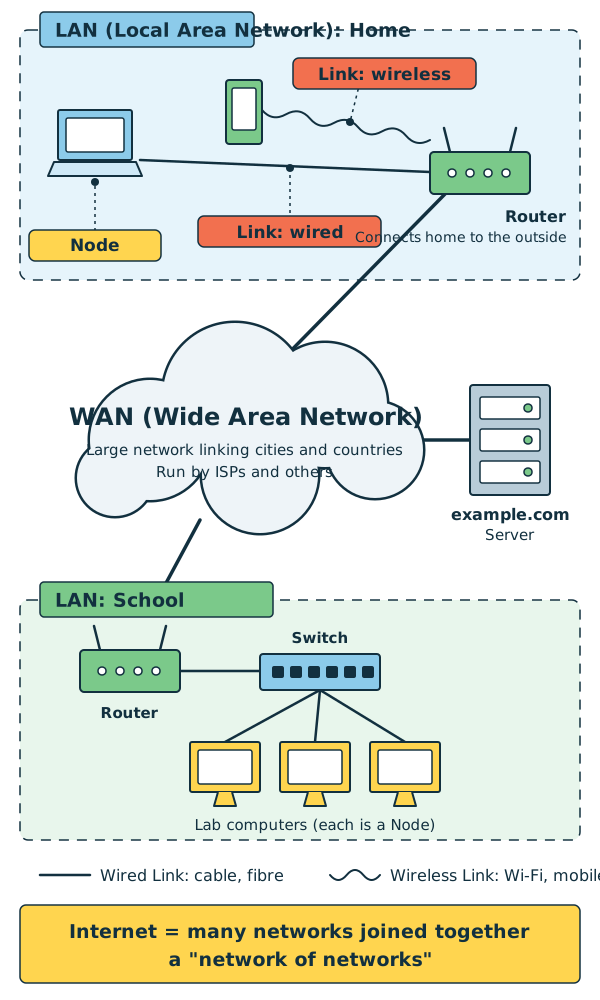
Diagram: the LAN at home and the LAN at school are both connected through a WAN, and can also reach the Server at example.com. Many networks joined together make the Internet.
So, back to our opening question: your friend's message sets off from their LAN, crosses one WAN after another, and finally enters your home LAN and arrives on your phone. That is how you receive a message from the other side of the world.
4. Try It Yourself
Task 1: Draw your home network map
- Count the devices at home that go online, such as phones, computers, TVs, game consoles and smart speakers. Every one of them is a Node.
- In the middle of a sheet of paper, draw a Router. It's usually the box with blinking lights and antennas that gets you online.
- Draw each device around the Router and join them with lines: a solid line for devices on a cable, a wavy line for devices on Wi-Fi.
- Congratulations! You've just drawn your own home LAN.
Task 2: Which LAN are you on?
Open the Wi-Fi settings on your phone:
- iPhone/iPad: Settings → Wi-Fi
- Android: Settings → Network & internet (or "Connections") → Wi-Fi (the names differ a little between brands)
The name with a tick, or marked "Connected", is your SSID (Service Set Identifier, the name of a Wi-Fi network). It is the wireless doorway into your home LAN. Look again when you're at school or in a café and you'll see a different name: you've joined another LAN.
Mini game
LAN or WAN?
Sort these six cards into "LAN" and "WAN":
-
1The phones and TV connected to Wi-Fi at home
-
2The 30 computers in a school computer room
-
3The undersea cable linking Hong Kong and Singapore
-
4A bank's network linking its branches across Hong Kong
-
5The computers and printer on one office floor
-
6A telecom company's fibre network linking every district in Hong Kong
All sorted correctly! A LAN is small and managed by a family, a school or a company; a WAN stretches across regions or even countries and is usually run by an ISP or a large organisation.
5. Where the Analogy Breaks
- Passing notes is slow, but networks are fast. Real networks send data as electrical signals, light or radio waves, and can go back and forth many times in a single second.
- A Link isn't always a wire. The comic draws cables, but Wi-Fi and mobile data are Links too. You just can't see them.
- Data isn't sent in one piece. In the comic, Pip carries off the whole photo at once. In reality the photo is cut into many Packets that are sent separately, sometimes even along different routes, and put back together when they arrive (more in Lesson 5).
- Home devices usually aren't wired directly to each other. To keep things simple, panel 3 draws cables between the devices. In reality, home devices each connect to a Router or Wi-Fi equipment, which passes the data along in the middle.
- A WAN isn't really a road. The roads in the comic are really optical fibres, undersea cables, satellite links and the like. And the difference between a LAN and a WAN isn't only distance, but also who manages it.
- The Internet isn't a cloud. The cloud in the diagram is just a symbol meaning "lots of other networks whose details we can't see".
6. Quiz
7. Key Notes
- A Network = two or more devices that are connected and can exchange data.
- A device that sends or receives data is a Node; the channel joining them is a Link, which can be wired or wireless.
- A small, self-managed network is a LAN (Local Area Network); one that stretches across cities and countries is a WAN (Wide Area Network).
- The Internet is a "network of networks": countless networks joined together by following a shared Protocol, with no single owner.
- We connect devices in order to communicate, share resources and use services.
Next Stop
Was the Internet suddenly invented one fine day? Hop into the time machine with Professor Arpa and watch networks grow up, step by step.