
1. Comic Opening
Comic text version (scenes and dialogue)
| Panel | Scene | Dialogue |
|---|---|---|
| 1 | Pip stands outside a house holding a letter marked 00:00:5E:00:53:01. Inside are Mac, a phone and a TV. |
Caption: "Pip arrives at a LAN (Local Area Network) to deliver a letter." Pip: "The envelope only has a string of numbers... with so many devices in there, who should get it?" |
| 2 | Mac points at the name tag on his chest. The number on it is exactly the same as the one on the envelope, with a tick between them. | Mac: "Check out my name tag!" Pip: "The numbers are exactly the same... it's you!" Caption: "The part of every device that connects to the network has a MAC Address from the moment it leaves the factory." |
| 3 | The name tag is enlarged and split into two halves, labelled OUI (Organizationally Unique Identifier) and the number assigned by the manufacturer. | Caption: "The tag has 12 hexadecimal digits, 48 bits in all." Mac: "The first half is the manufacturer's code, and the second half is the number the manufacturer gave me." Pip: "Like a school badge plus a student number!" |
| 4 | Pip holds a megaphone and the envelope reads FF:FF:FF:FF:FF:FF. All the devices in the house hold up "Got it!" signs. |
Caption: "A recipient of FF:FF:FF:FF:FF:FF is the Broadcast Address." Pip: "Attention, everyone! This letter is for all of you!" Mac: "Everyone in the same LAN gets it!" |
2. Key Idea
Every device that goes online has a name tag sewn onto it at the factory.
This name tag is called a MAC Address. It is a 48-bit identifier, written as six groups of hexadecimal digits, such as 00:00:5E:00:53:01. Inside the same LAN (Local Area Network), devices use it to recognise "this letter is for me".
The first half of the name tag is the OUI (Organizationally Unique Identifier), which stands for the manufacturer. The second half is numbered by the manufacturer itself.
3. A Closer Look
What does MAC stand for?
MAC stands for Media Access Control. It has nothing to do with any brand of "Mac" computer. Phones, computers, TVs, game consoles and even smart light bulbs of any brand have a MAC Address, as long as they go online.
Where does the name tag hang? The Network Interface
Strictly speaking, a MAC Address doesn't belong to the "whole device". It belongs to each Network Interface on the device. A Network Interface is the part a device uses to connect to a network, such as a Wi-Fi chip or an Ethernet cable socket. In older computers it was usually a card plugged into the motherboard, which is why it is also called a NIC (Network Interface Card).
So:
- A laptop with both Wi-Fi and an Ethernet socket has two MAC Addresses.
- A phone that has only Wi-Fi usually has just one MAC Address, for Wi-Fi.
Reading the name tag: 48 bits and Hexadecimal
All data in a computer ends up as a long string of 0s and 1s.
- Bit: the smallest unit of data in a computer, which can only be 0 or 1.
- Byte: 8 Bits make 1 Byte.
- MAC Address: 48 Bits in all, which is 6 Bytes.
Writing 48 zeros and ones directly would be far too long and easy to copy wrongly. So we use Hexadecimal instead. It uses 16 symbols, 0 to 9 plus A to F, to represent numbers (A = 10, B = 11 ... F = 15).
| Decimal | Hexadecimal | Binary (4 Bits) |
|---|---|---|
| 5 | 5 |
0101 |
| 9 | 9 |
1001 |
| 10 | A |
1010 |
| 14 | E |
1110 |
| 15 | F |
1111 |
One hexadecimal digit stands for exactly 4 Bits, so two hexadecimal digits make 1 Byte. For example, 5E = 0101 1110.
So a MAC Address is 12 hexadecimal digits, in six groups of two. 48 Bits can make 281,474,976,710,656 different name tags (about 281 trillion).
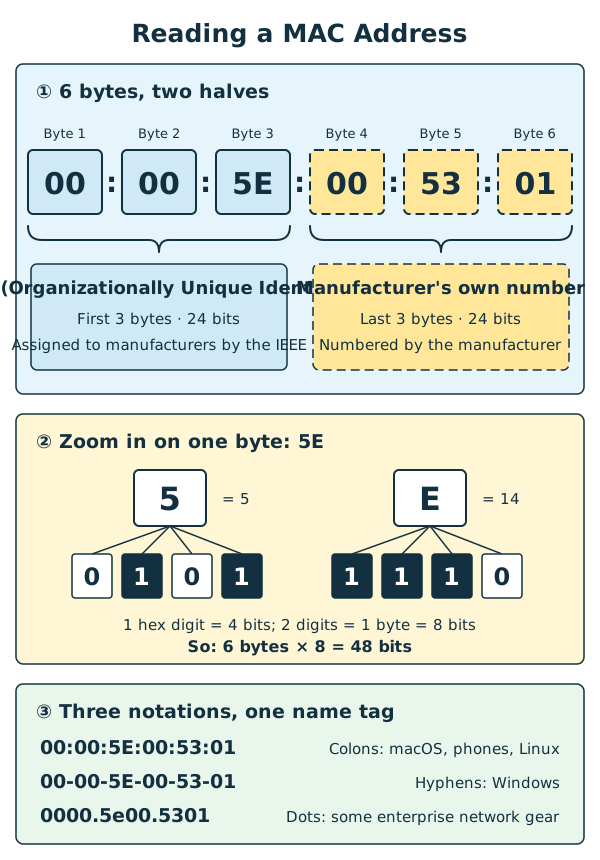
Diagram: a MAC Address has 6 Bytes. The first 3 Bytes are the OUI (Organizationally Unique Identifier), and the last 3 Bytes are numbered by the manufacturer. Each Byte is shown as two hexadecimal digits.
The two halves of the tag: the OUI
| Part | Position | Decided by | Example |
|---|---|---|---|
| OUI (Organizationally Unique Identifier) | First 3 Bytes (24 bits) | Assigned to the manufacturer by the IEEE (Institute of Electrical and Electronics Engineers) | 00:00:5E |
| Number assigned by the manufacturer | Last 3 Bytes (24 bits) | Numbered by the manufacturer itself | 00:53:01 |
The IEEE is an international organisation that sets technical standards such as Ethernet and Wi-Fi, and it gives different OUIs to different manufacturers. After each OUI there are 24 bits, which can make 16,777,216 numbers. When a large manufacturer uses them all up, it applies for a new OUI.
With this division of work, even if two companies number their devices separately, they will never produce the same name tag.
The example addresses in this lesson Every example in this lesson comes from a block of addresses set aside for teaching materials and documentation (
00:00:5E:00:53:00to00:00:5E:00:53:FF), and does not belong to any real product. The OUI00:00:5Ewas actually assigned by the IEEE to an Internet standards body, not to a real manufacturer. This lesson only borrows it for demonstration.
Three ways of writing, one name tag
Different systems show a MAC Address in slightly different ways, but the meaning is exactly the same. Upper-case or lower-case letters make no difference either.
| Style | Example | Commonly seen on |
|---|---|---|
| Separated by colons | 00:00:5E:00:53:01 |
macOS, iPhone, Android, Linux |
| Separated by hyphens | 00-00-5E-00-53-01 |
Windows |
| Separated by dots (groups of 4 digits) | 0000.5e00.5301 |
Some enterprise network equipment |
Delivering letters inside a LAN: the recipient and sender of a Frame
When data is sent inside a LAN, it is put into a Frame. A Frame is the "delivery packaging" for data travelling within a LAN, with a delivery label stuck on the front that says:
| Field | Content | Example |
|---|---|---|
| Recipient MAC Address | Which Network Interface it is for | 00:00:5E:00:53:01 |
| Sender MAC Address | Which Network Interface it was sent from | 00:00:5E:00:53:02 |
When a device receives a Frame, it looks at the recipient first:
- It's my name tag → keep it and open it.
- It's not my name tag → ignore it and throw it away.
Both wired Ethernet and wireless Wi-Fi use MAC Addresses to write the recipient and the sender. The relationship between a Frame and a Packet is covered in Lesson 5.
Unicast and Broadcast
- Unicast: the recipient is an ordinary MAC Address, so the letter goes to just one device. Most Frames in everyday use are Unicast.
- Broadcast: the recipient is written as
FF:FF:FF:FF:FF:FF, which means all 48 Bits are 1. This special Broadcast Address means "every device in the same LAN". It only ever appears in the recipient field, and is never the name tag of any device.
When do we need a Broadcast? Usually when a device wants to find someone but doesn't know their name tag. For example:
- When a phone has just joined Wi-Fi and doesn't have an IP Address yet, it broadcasts: "Can anyone give me an address?" This is DHCP (Dynamic Host Configuration Protocol), in Lesson 8.
- When a computer knows another device's IP Address but not its MAC Address, it broadcasts: "Who has this address?" This is ARP (Address Resolution Protocol), in Lesson 6.
A Broadcast stays inside its own LAN. A Router doesn't pass it on to other networks. Otherwise the broadcasts of the whole world would flood into your home and the network would jam.
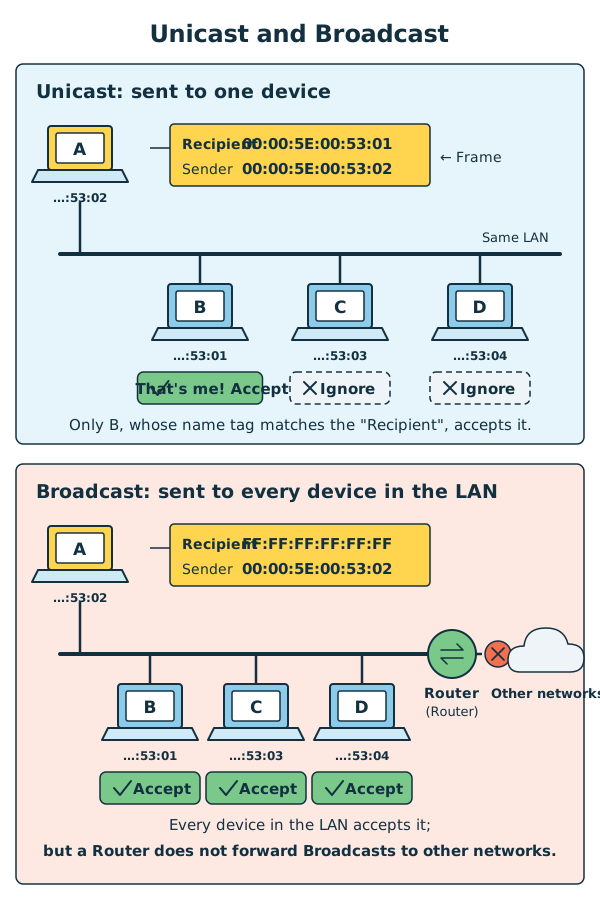
Diagram: the top half shows Unicast, where only the device with the matching name tag keeps the Frame and the others ignore it. The bottom half shows Broadcast, where every device in the same LAN keeps it, but the Broadcast doesn't cross a Router into other networks.
The name tag is only useful inside a LAN
A MAC Address only handles "getting to the right device inside the same LAN". When data has to leave your home and pass through a Router to other networks, the Router removes the old delivery label and sticks on a new one, so both the sender and recipient MAC Addresses change.
That's why, when you open example.com, the faraway Server generally can't see your phone's MAC Address. The job of "finding the way across networks" belongs to the IP Address, in the next lesson.
Can the name tag be changed? Random MAC Addresses
The original name tag is written in the chip of the network interface, but the operating system can choose to use a different address instead.
Why do that? For privacy. If a phone used the same name tag everywhere, the Wi-Fi at a shopping centre or a station could record "where this phone has been". So many systems now use a different Random MAC Address for each Wi-Fi network:
| System | Feature name (go by what your own screen says) |
|---|---|
| iPhone/iPad (from iOS 14) | Private Wi-Fi Address |
| Android (on by default from Android 10) | Randomised MAC / Use randomised MAC |
| Windows 10/11 | Random hardware addresses (off by default, you have to turn it on) |
Handy tip: if the second digit of the first pair of digits in a MAC Address is 2, 6, A or E, it is a "custom name tag" and is very likely a Random MAC Address. For example ?2:…, ?6:…, ?A:…, ?E:….
4. Try It Yourself
Task 1: Find your MAC Address
| Device | Steps |
|---|---|
| iPhone/iPad | Settings → General → About → look for "Wi-Fi Address" |
| Android | Settings → About phone → Status (or "Hardware information") → look for "Wi-Fi MAC address" (the names differ a little between brands) |
| Windows | Search for "Command Prompt" in the Start menu and open it, type ipconfig /all, and in the "Wi-Fi" section look for "Physical Address" |
| macOS | System Settings → Network → Wi-Fi → click "Details" next to the connected network → Hardware |
Take a look at your MAC Address:
- Does it have six groups of two digits each?
- Which separator does it use: colons, hyphens or dots?
- Circle the first three groups. That is the OUI (Organizationally Unique Identifier).
Privacy reminder: a MAC Address isn't a password, but it doesn't need to be public either. For this exercise, don't post your real MAC Address online or send it to anyone.
Task 2: Name tag detective
This task works best on a phone.
- On an iPhone, go to "Settings → Wi-Fi", tap the ⓘ next to the connected network and find "Wi-Fi Address" (if Private Address is on, the private address is shown). On Android, find "MAC address" in the Wi-Fi network's details.
- Compare it with the address you found in Task 1. Are the two the same?
- Use the "Handy tip" in this lesson to check: is the second digit
2,6,AorE? If so, congratulations: your phone is wearing a random name tag to protect your privacy!
Mini game
Real name tag or fake?
Which of these are correctly written MAC Addresses?
-
1
00:00:5E:00:53:2A -
2
00:00:5E:00:53 -
300:00:5E:00:53:G7
-
4
192.168.1.10 -
5
FF:FF:FF:FF:FF:FF -
6
0000.5e00.532a
All sorted correctly! A MAC Address must have 12 hexadecimal digits (0 to 9 and A to F), 48 Bits in all. Colons, hyphens and dots are all correct styles, and upper-case or lower-case makes no difference.
5. Where the Analogy Breaks
- The name tag isn't really sewn on for good. The original MAC Address is written in the chip, but the operating system can use a different address instead, such as a Random MAC Address. So a MAC Address can't prove "this is definitely that particular device".
- Name tags aren't guaranteed to be unique worldwide. By design every name tag leaving the factory should be different, but random name tags, manufacturer mistakes and the like occasionally cause duplicates. In practice, the network works fine as long as no two name tags in the same LAN are the same.
- The name tag belongs to a network interface, not to the whole device. In the comic Mac wears just one name tag, but a computer with both Wi-Fi and an Ethernet socket actually has two.
- A name tag can't be used to find the way. Knowing someone's name tag doesn't tell you where they live. A MAC Address is only useful inside the same LAN. To find the way across networks you need the IP Address (Lesson 4).
- A Broadcast isn't really "shouting". It is just a Frame whose recipient is written as
FF:FF:FF:FF:FF:FF, and it stays inside the same LAN rather than travelling around the world. - Not every device "sees" every letter. To keep things simple, the comic shows every device in the house seeing the envelope. In reality, a Switch usually delivers a Unicast Frame only to the right device (more in Lesson 6).
6. Quiz
7. Key Notes
- A MAC Address is the name tag of a Network Interface from the day it leaves the factory, and a device can have more than one.
- It is 48 bits (6 Bytes), written as six groups of hexadecimal digits, such as
00:00:5E:00:53:01. - The first 3 Bytes are the OUI (Organizationally Unique Identifier), and the last 3 Bytes are numbered by the manufacturer.
FF:FF:FF:FF:FF:FFis the Broadcast Address, which every device in the same LAN receives.- A MAC Address is only used for delivery inside the same LAN. To protect privacy, phones often use a Random MAC Address instead.
Next Stop
Mac takes his laptop to a café to get online. His name tag is still the same, but his address has changed. What is this address that changes with the network?