
1. Comic Opening
Comic text version (scenes and dialogue)
| Panel | Scene | Dialogue |
|---|---|---|
| 1 | Pip is at Rue's post office counter. The envelope shows only the name tag number 00:00:5E:00:53:01, and Rue looks puzzled. |
Caption: "Pip wants to send a letter to Mac, who lives far away." Pip: "Rue, please deliver this letter to Mac!" Rue: "There's only a name tag and no address... I don't know which network he's on!" |
| 2 | Mac is at home with his name tag on his chest, holding an address card: Private IP 192.168.1.10. The Router at home has the Public IP 203.0.113.1. |
Caption: "An IP Address works like a postal address." Mac: "The name tag says who I am. The address says where I am!" |
| 3 | Mac is at a coffee shop and his name tag has not changed. The old address card 192.168.1.10 is crossed out and replaced by a new one, 192.168.0.23. The coffee shop Router has the Public IP 198.51.100.1. |
Caption: "Mac takes his laptop to a coffee shop to get online." Mac: "New network, same name tag, different address!" |
| 4 | Rue stands at a fork. The signposts read 203.0.113.0/24 (home) and 198.51.100.0/24 (coffee shop). Pip's letter is now addressed to the coffee shop's Public IP, 198.51.100.1. |
Caption: "On the Internet, a Router reads the network part of the Public IP to choose the way. Once the letter arrives at the coffee shop, the Router there hands it over to Mac." Rue: "The 198.51.100 area? This way, this is the fastest route!" |
2. Key Idea
A MAC Address is a device's name tag. It says who you are. But to deliver a letter far away, you also need a postal address that says where you are.
An IP Address is a device's address on a network. It is handed out by the network you are on, so it changes when you change networks. Routers use it to carry data, one stop at a time, to the right network.
3. A Closer Look
Why do we need an address when we already have a name tag?
In the last lesson you learned that a MAC Address is only useful inside one LAN (Local Area Network). It is like a name tag: you know the person's name, but not which district or street they live on.
Imagine postal workers all over the world holding billions of names but no addresses. They could never deliver a single letter. The IP Address solves this problem. The address itself says which network a device is on, so a Router only has to read it to know which direction to send the data next.
| MAC Address | IP Address | |
|---|---|---|
| Analogy | A name tag sewn on | A postal address |
| Question it answers | Who are you? | Where are you? |
| Who decides it | Set by the manufacturer at the factory (or generated randomly by the system) | Assigned by the network you are on |
| When you change network | Usually stays the same | Changes |
| Where it is useful | Within one LAN | Across networks, all the way to the other side of the Internet |
| Length | 48 bits | IPv4 is 32 bits; IPv6 is 128 bits |
The two work as a team. On each LAN segment, data is delivered to the next stop using the MAC Address. Over the whole journey, the IP Address decides the direction.
IPv4: an address made of four numbers
The most common IP Address today is IPv4. It is 32 bits long and is written as four decimal numbers separated by dots. For example, Mac's address at home:
192.168.1.10
- Each number stands for 8 bits, so it can only be 0 to 255.
- Four groups × 8 bits = 32 bits.
- 32 bits can make 4,294,967,296 addresses (about 4.3 billion).
This way of writing is called dotted decimal. 192.168.1.300 is wrong, because 300 is bigger than 255.
Two parts of an address: the network part and the host part
An IP Address can be split into two parts, just like a postal address has an "area and street" and a "door number":
| Part | Meaning | Example in 192.168.1.10/24 |
|---|---|---|
| Network part | Which network you are on | 192.168.1 |
| Host part | Which device on that network | 10 |
The /24 after the address means the first 24 bits (the first three numbers) are the network part. All addresses that share the same network part belong to the same Subnet. A Subnet is a smaller piece of a bigger network, like a city divided into streets.
Some devices don't show /24. Instead they show a Subnet Mask: 255.255.255.0. A Subnet Mask is just another way of saying which bits belong to the network part. 255.255.255.0 and /24 mean exactly the same thing.
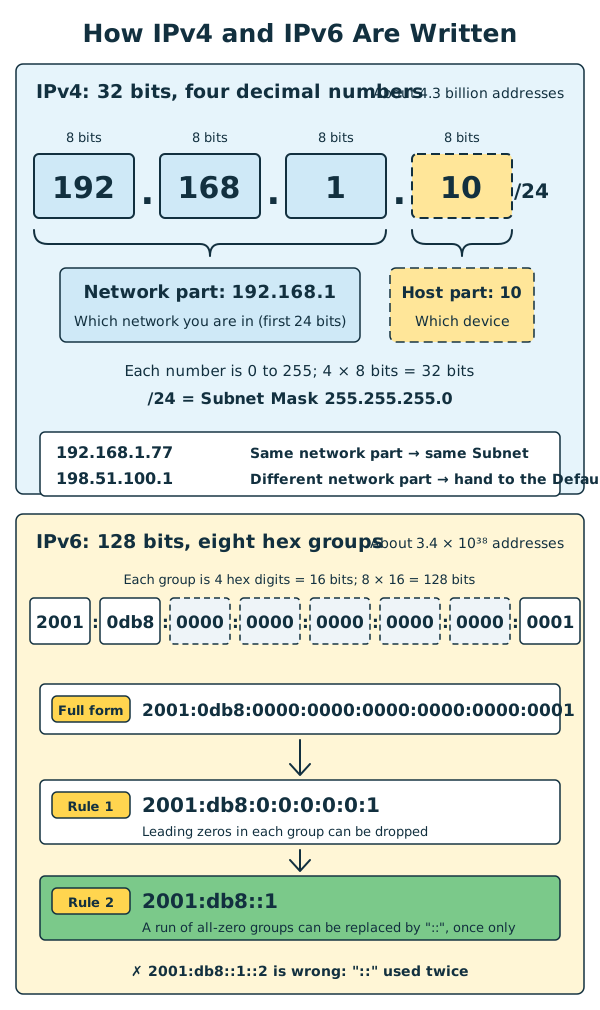
Diagram: The top half shows IPv4, four groups of 8 bits each, where /24 means the first three groups are the network part. The bottom half shows IPv6, eight groups of 16 bits each, and how it is shortened to 2001:db8::1.
Same Subnet or not: do we still need a Router?
Before sending data, a device compares its own network part with the other device's network part:
- Same → the other device is in the same Subnet, so the data is delivered directly inside the LAN (using the MAC Address from the last lesson).
- Different → the other device is on another network, so the data is handed to a Router first, and the Router forwards it.
The Router that a device hands its "outgoing mail" to is called the Default Gateway. The Default Gateway is your network's door to the outside world. At home, it is usually your home Router.
Notice that a Router stands between two networks, so it has two IP Addresses. Take Mac's home as an example:
- Inside (the home LAN): Private IP
192.168.1.1. This is the Default Gateway for the devices at home. - Outside (the Internet): Public IP
203.0.113.1, assigned by the ISP (Internet Service Provider).
Example (Mac at home, /24):
| My address | The other address | Same network part? | How it is sent |
|---|---|---|---|
192.168.1.10 |
192.168.1.77 (the TV at home) |
Same (192.168.1) |
Delivered directly inside the LAN |
192.168.1.10 |
198.51.100.1 (the coffee shop's Public IP) |
Different | Handed to the Default Gateway 192.168.1.1 |
In a /24 Subnet, the host part runs from 0 to 255. But .0 stands for the whole network, and .255 is the Subnet's Broadcast Address, so only 254 addresses can actually be given to devices.
Public IP and Private IP
IPv4 addresses come in two kinds: one kind is used on the Internet, and the other is used only inside a home, school or company.
| Public IP | Private IP | |
|---|---|---|
| Analogy | The street address of a building | The flat number inside the building |
| Where it is used | On the Internet | Inside the network of a home, school or company |
| Who assigns it | The ISP | Your Router |
| Is it unique? | Unique on the Internet | Different homes can reuse the same ones |
| Can it be reached directly from the Internet? | Yes | No |
Private IPs can only come from the three ranges below. Routers on the Internet will not forward data addressed to these, so they never appear on the Internet:
| Range | Commonly found in |
|---|---|
10.0.0.0 to 10.255.255.255 |
Large companies, schools |
172.16.0.0 to 172.31.255.255 |
Company networks |
192.168.0.0 to 192.168.255.255 |
Home Routers, such as 192.168.1.x |
Most phones and computers at home use Private IPs. When the whole household goes online, they share one Public IP on the Router. This sharing trick is called NAT (Network Address Translation), and Lesson 8 explains it in more detail.
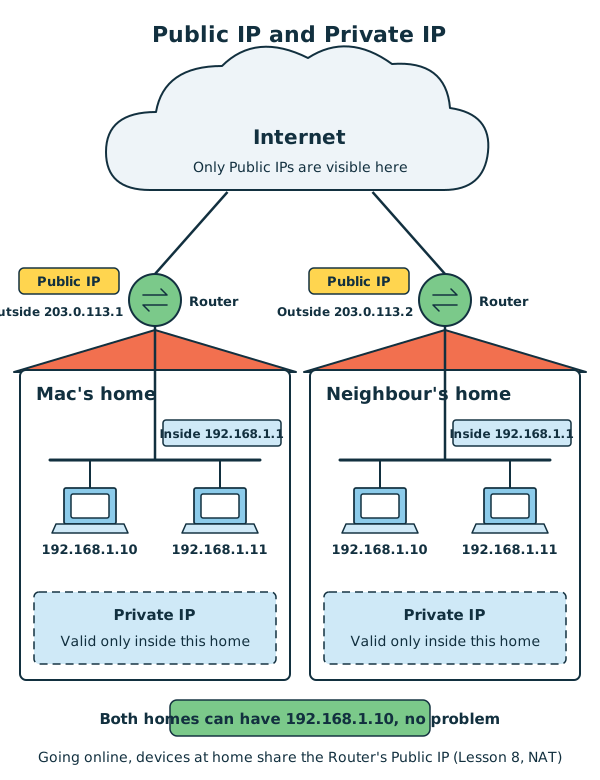
Diagram: Mac's home and the neighbour's home both contain 192.168.1.10 and 192.168.1.11, and even the Router's inside address is the same, 192.168.1.1. There is no confusion, because a Private IP only counts inside its own home. When going online, the two homes use their Routers' outside Public IPs, 203.0.113.1 and 203.0.113.2.
How can you tell a Public IP from a Private IP at a glance?
Look at the start of the IPv4 address:
- Starts with
10.→ Private IP - Starts with
172.and the second number is 16 to 31 → Private IP - Starts with
192.168.→ Private IP - Any other ordinary address → Public IP
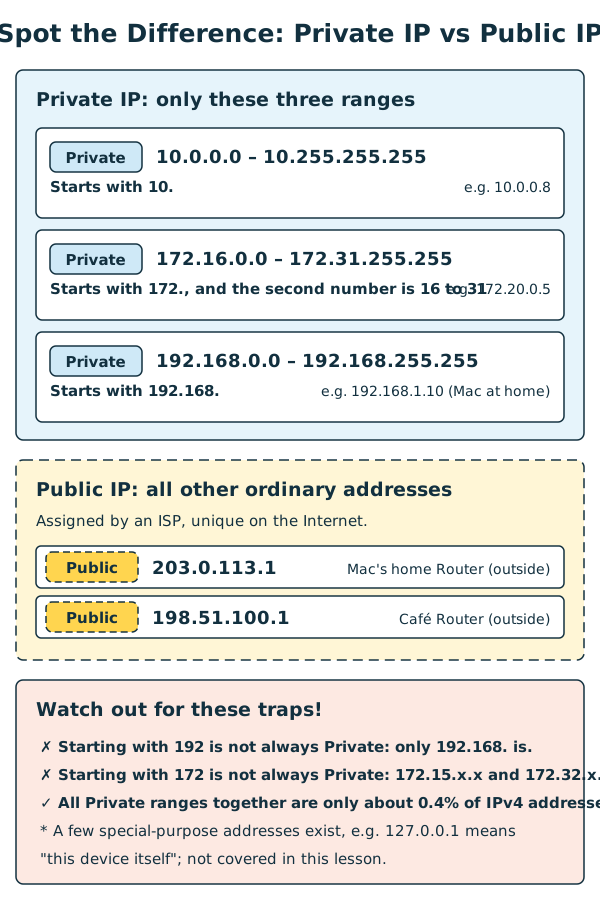
Chart: Private IPs have only three ranges, and every other ordinary address is a Public IP. Be careful: an address starting with 192 or 172 is not always Private, so check the numbers that follow.
Here is every address used in this lesson, sorted out:
| Address | Whose address | Type |
|---|---|---|
192.168.1.10 |
Mac's computer at home | Private IP |
192.168.1.1 |
The home Router (inside) | Private IP |
203.0.113.1 |
The home Router (outside) | Public IP |
192.168.0.23 |
Mac's computer at the coffee shop | Private IP |
192.168.0.1 |
The coffee shop Router (inside) | Private IP |
198.51.100.1 |
The coffee shop Router (outside) | Public IP |
So in the comic, when Mac changes networks, his Private IP changes from 192.168.1.10 to 192.168.0.23. What everyone else on the Internet sees changes from the home's 203.0.113.1 to the coffee shop's 198.51.100.1.
Why do we have Private IPs? The story of a "temporary" fix
4.3 billion IPv4 addresses sounds like a lot, but the world's phones, computers and TVs added together passed that number long ago. Engineers saw the problem coming very early:
| Year | What happened |
|---|---|
| 1981 | IPv4 became an official standard. There were very few computers in the world then, so 4.3 billion addresses looked endless. |
| Early 1990s | The Internet grew fast, and engineers realised IPv4 addresses would run out sooner or later. |
| 1994 | Engineers proposed NAT so that many devices could share one Public IP. Its authors said at the time that it was only a short-term fix. |
| 1996 | The three Private IP ranges were officially set, so any home or organisation could reuse them freely inside its own network. |
| 1998 | IPv6, the long-term solution, was officially published. |
| February 2011 | The international organisation in charge of global address allocation handed out the last batch of IPv4 addresses to the regions. |
| April 2011 | The organisation in charge of the Asia-Pacific region (including Hong Kong) was also down to its last batch and began to ration addresses strictly. |
With Private IPs and NAT, a home, a school or even a whole company may need only one Public IP to get online. This slowed the running-out of IPv4 addresses a great deal, which is why IPv4 lasted until 2011 before the supply was fully handed out.
Interestingly, this "temporary" method has now been in use for thirty years, and it is still used in every home. It does have a downside, though: devices at home hide behind the Router, so other people on the Internet cannot reach them directly (Lesson 8 covers this). That is why, in the long run, everyone is slowly moving to IPv6, which has more addresses than we could ever use.
Example addresses in this lesson The Public IP examples in this lesson use addresses reserved for documentation (
203.0.113.x,198.51.100.x,2001:db8::). The Private IP examples use the real private range192.168.x.x, because private addresses never appear on the Internet and so cannot point to anyone's real device. This way, the type of every example matches the real world.
IPv6: a longer address
To solve the shortage of addresses once and for all, engineers designed IPv6. It is 128 bits long and is written as eight groups of four hexadecimal digits, with a ":" between groups:
2001:0db8:0000:0000:0000:0000:0000:0001
128 bits can make about 3.4 × 10³⁸ addresses, which is 34 followed by 37 zeros. That is enough to give every grain of sand on Earth many addresses.
An address this long is hard to write, so there are two shortening rules:
- Leading zeros in each group can be left out:
0db8→db8,0000→0,0001→1. - A run of consecutive all-zero groups can be replaced by "::", but only once in the whole address.
2001:0db8:0000:0000:0000:0000:0000:0001 → 2001:db8:0:0:0:0:0:1 → 2001:db8::1
Why can "::" be used only once? If it appeared twice, there would be no way to tell how many zero groups each "::" stands for. The letters in IPv6 addresses are usually written in lowercase.
Today, many mobile networks and home broadband services support both IPv4 and IPv6, so your phone probably has both kinds of address.
Where do addresses come from?
You normally don't have to set an IP Address on your device yourself. When you connect to Wi-Fi, the Router hands you an address automatically, like a hotel front desk handing out room keys. The protocol that does this is DHCP (Dynamic Host Configuration Protocol), which Lesson 8 explains in detail.
4. Try It Yourself
Task 1: Find your IP Address
| Device | Steps |
|---|---|
| iPhone / iPad | Settings → Wi-Fi → tap the ⓘ next to the connected network → look at the "IPv4 Address" row |
| Android | Settings → Network & internet → Wi-Fi → tap the connected network → details (the names differ a little between brands) |
| Windows | Open "Command Prompt", type ipconfig, and look for "IPv4 Address", "Subnet Mask" and "Default Gateway" |
| macOS | System Settings → Network → Wi-Fi → click "Details" next to the connected network → TCP/IP |
Write down three things:
- Your IP Address
- The Subnet Mask, or a short form such as
/24 - The Default Gateway, which shows as "Router" on an iPhone
Then think about these questions:
- Is your IP Address inside one of the three Private IP ranges?
- Do your IP Address and your Default Gateway have the same network part? (They should, because they are in the same Subnet.)
- If you see a very long address separated by ":" (for example, one starting with
fe80or2), that is your IPv6 address!
Task 2: Which address does the Internet see?
- Use a search engine to search for "my IP address". Many search engines and websites will show your IP Address as seen on the Internet.
- Compare it with the address you found in Task 1. Are the two the same?
- If they are different, the one from Task 1 is your home's Private IP, and the one from Task 2 is your Router's Public IP on the Internet.
Privacy tip: A Public IP can roughly show which ISP you use and which city you are connecting from. Don't post it in public places online.
Mini game
IPv4, IPv6, or neither?
Sort the six cards below into three groups:
-
1
192.168.1.10 -
2
198.51.100.256 -
3
2001:db8::1 -
4
2001:db8::1::2 -
5
00:00:5E:00:53:01 -
6
198.51.100.7
All sorted correctly! IPv4 is four decimal numbers from 0 to 255. IPv6 is up to eight groups of up to four hexadecimal digits each, and a run of all-zero groups can be replaced by "::", but only once.
Mini game
Public IP or Private IP?
Use the "at a glance" method to sort the six IPv4 addresses below into two groups:
-
1
192.168.1.10 -
2
203.0.113.1 -
3
10.0.0.8 -
4
198.51.100.1 -
5
172.20.0.5 -
6
192.168.0.23
All sorted correctly! Private IPs come from only three ranges: 10.x.x.x, 172.16.x.x to 172.31.x.x, and 192.168.x.x. Every other ordinary address is a Public IP.
5. Where the Analogy Breaks
- An address doesn't always change with your location. A postal address changes only when you move house. But an IP Address is assigned by the network, so even if you sit still, the Router may give you a new address after a restart or after some time has passed.
- One device can have several addresses. A person usually has one home address, but a phone can have both an IPv4 and an IPv6 address at the same time, and Wi-Fi and mobile data each have their own address.
- A Private IP is not unique. A postal address is unique in the whole world, but
192.168.1.10can appear in thousands upon thousands of homes at once, as long as it isn't repeated within the same network. - An IP Address cannot pinpoint your home. A postal address leads to your front door, but a Public IP can only give a rough idea of which city you are in and which ISP you use.
- The network part is not always "the first three numbers". The examples in this lesson all use
/24, but real networks can use/16,/20,/26and other lengths, and the dividing line doesn't always fall on a ".". - Rue doesn't know the whole route. In the comic, Rue reads the address and points the way. In real life, each Router only decides the "next stop", by looking it up in a Routing Table. Lesson 6 explains more.
6. Quiz
7. Key Notes
- A MAC Address says who you are, and an IP Address says where you are. When you change networks, your IP Address changes.
- IPv4 is 32 bits, written as four numbers from 0 to 255, such as
192.168.1.10. IPv6 is 128 bits, written as eight groups of hexadecimal digits, such as2001:db8::1. - An IP Address has a network part and a host part.
/24(the same as the Subnet Mask255.255.255.0) means the first 24 bits are the network part. Addresses with the same network part are in the same Subnet. - Data going to another network is first handed to the Default Gateway, which is your Router.
- Devices at home mostly use Private IPs. When going online, they share the Router's Public IP through NAT. This "temporary" trick was invented to delay the running out of IPv4 addresses, and the long-term answer is IPv6.
Next Stop
Pip now knows who the recipient is and where they live. But where is all of this information written? And why is his backpack wrapped layer upon layer?