
1. Comic Opening
Comic text version (scenes and dialogue)
| Panel | Scene | Dialogue |
|---|---|---|
| 1 | Next to Mac is a giant photo, and Pip's backpack is only as big as one corner of it. | Caption: "Mac wants to send a 3 MB photo to example.com."Mac: "Pip, please send this photo for me!" Pip: "But... this photo is thousands of times bigger than me!" |
| 2 | The photo is cut into many small pieces, and a row of Pips each carry one piece. The backpacks are labelled with numbers. | Caption: "Big data is cut into small portions, and each portion is a Packet." Pip: "We set off separately, and put it back together when we arrive!" |
| 3 | Pip demonstrates "layer after layer": letter → envelope: Port 443 → backpack: recipient 192.0.2.80 → delivery bag: MAC Address. |
Caption: "Each layer adds its own label on the outside. This is called Encapsulation." Pip: "Backpack on, let's go!" |
| 4 | Rue puts a new outer delivery bag on Pip. The old bag goes into the recycling bin, and the recipient on the backpack stays the same. | Caption: "At every stop, the outermost delivery bag is replaced." Rue: "I'll swap the delivery bag, but I won't change a single word on the backpack!" |
2. Key Idea
On a network, data is not sent in one big lump. It is cut into many small portions. Each small portion is called a Packet, like a row of little Pips, each wearing a backpack.
The backpack is the Header. It holds details such as who the recipient and sender are. The letter inside the backpack is the Payload, which is the thing that really needs to be delivered.
Before leaving, the data goes through several layers of processing. Each layer adds a label of its own on the outside, like wrapping paper around a gift, layer after layer. This is called Encapsulation.
3. A Closer Look
Example addresses in this lesson This lesson assumes that the server for
example.comis at192.0.2.80.192.0.2.xis a Public IP range reserved for teaching materials, and it never points to a real server. Note that it starts with 192, but it is not a Private IP. Only addresses starting with192.168.are.
Why cut the data into small portions?
Lesson 2 covered Packet Switching: data is cut into small portions, each portion finds its own way, and everyone shares the lines. It has three benefits:
- Fairness: One person sending a big file doesn't hog the whole line. Other people's small packets can slip through the gaps.
- Only a small piece needs resending: If one portion is lost on the way, only that portion is sent again. There is no need to start from the beginning.
- Different routes are possible: If one road is jammed, later packets can take a detour.
How big can one packet be? The most common kind of Ethernet carries at most 1,500 bytes at a time. This upper limit is called the MTU (Maximum Transmission Unit). After the headers are taken out, each packet can carry about 1,460 bytes of data.
So a 3 MB photo (about 3,000,000 bytes) has to be cut into more than 2,000 packets.
What is in the backpack? Header and Payload
| Part | Analogy | Contents |
|---|---|---|
| Header | Pip's backpack | "Delivery details": recipient, sender, sequence number, checksum and so on |
| Payload | The letter inside the backpack | The data that really needs to be sent, such as a small piece of a photo |
The Header is like the writing on an envelope: a postal worker reads only the envelope and doesn't open the letter. Network devices work the same way. Most of them look only at the Header to decide how to send a packet.
Layer after layer: the TCP/IP Model
Sending a packet means solving many problems at once. What format is the data in? Which program on the other computer is it for? Which network is the other computer on? Who is the next stop?
Engineers split this work into layers, and each layer takes care of just one thing. These are the Network Layers. This website mainly uses the TCP/IP Model, which has four layers:
| Layer | Name | What it does | What its label says | Examples |
|---|---|---|---|---|
| 4 | Application Layer | Prepares the content to be sent | The web page, photo or message itself | HTTPS (Hypertext Transfer Protocol Secure), DNS (Domain Name System) |
| 3 | Transport Layer | Decides which program on the other computer receives it, and whether delivery must be guaranteed | Port numbers, sequence numbers | TCP (Transmission Control Protocol), UDP (User Datagram Protocol) |
| 2 | Internet Layer | Gets it to the right network and the right device | The IP Addresses of the sender and recipient | IPv4, IPv6 |
| 1 | Link Layer | Delivers it to the next stop within this LAN (Local Area Network) segment | The MAC Addresses of the sender and recipient | Ethernet, Wi-Fi |
When data is sent, it travels down from Layer 4, and each layer adds its own Header on the outside. This is Encapsulation. When data arrives, it travels up from Layer 1, and each layer removes its own label. This is called Decapsulation.
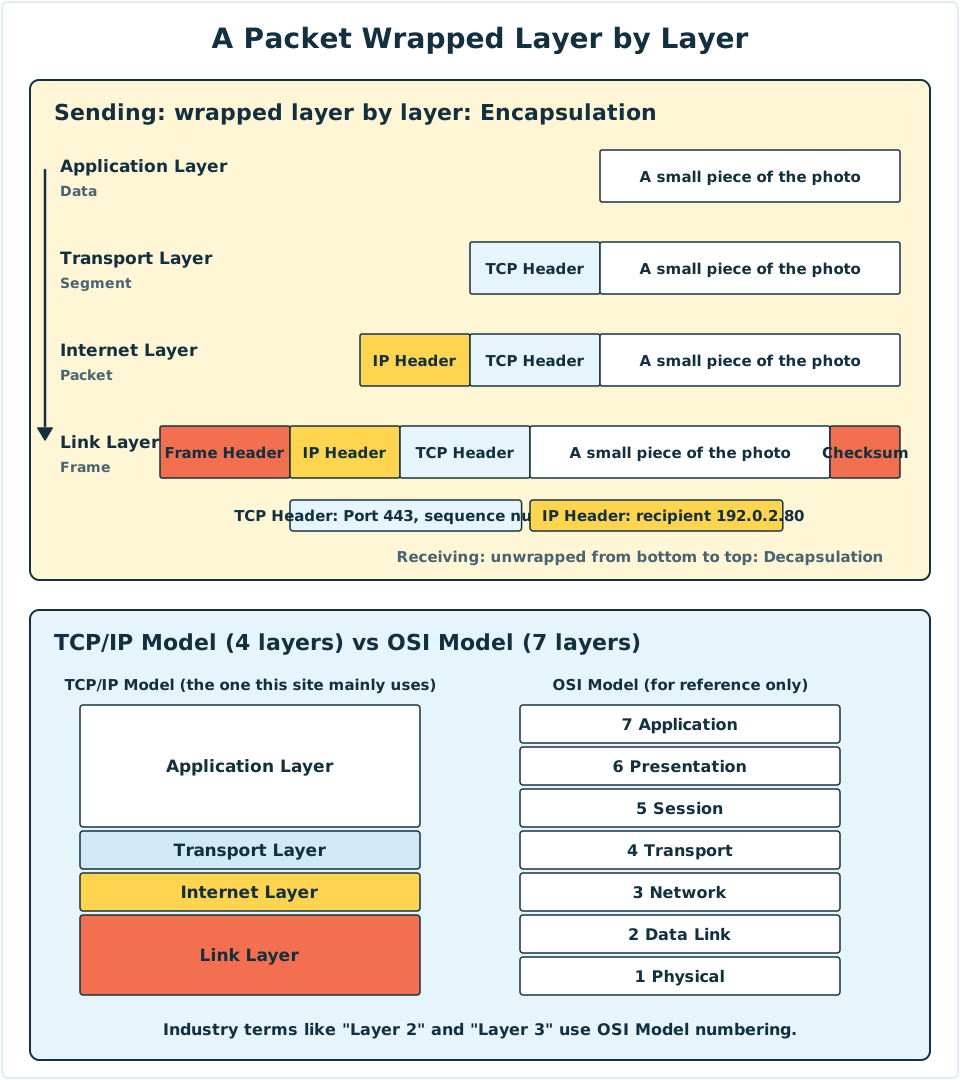
Diagram: On the left is the process of Encapsulation, where each step down adds one more Header on the outside. On the right, the four layers of the TCP/IP Model are lined up with the seven layers of the OSI Model.
Each layer's package has its own name
The same piece of data has different names at different layers. You will see these names often in English textbooks later:
| Layer | What this layer's package is called |
|---|---|
| Application Layer | Data |
| Transport Layer | Segment (called a Datagram when UDP is used) |
| Internet Layer | Packet |
| Link Layer | Frame |
The Frame from Lesson 3 is the outermost delivery bag. Its Header carries the MAC Address, and there is also a checksum at the end, which is used to spot errors on the way. On the cable or on the radio waves, the Frame finally turns into a stream of 0 and 1 signals.
In everyday speech, people often call the package at every layer a "packet". This website does too, but you should know the strict names.
A new delivery bag at every stop
When data travels from Mac's computer (192.168.1.10) to the example.com server (192.0.2.80), it passes through many Routers on the way. At each Router:
- The Router opens the outermost Frame and reads the IP recipient inside.
- It looks up where the next stop is.
- It puts on a new Frame, writes the MAC Address of the next stop on it, and sends it out.
So:
| Label | Does it change along the way? |
|---|---|
| The MAC Address on the Frame | Replaced at every stop, and only responsible for "this segment" |
The IP recipient (192.0.2.80) |
Never changes, and is responsible for "the whole journey" |
This is the division of labour between Lesson 3 and Lesson 4: the MAC Address handles one segment, and the IP Address handles the whole trip.
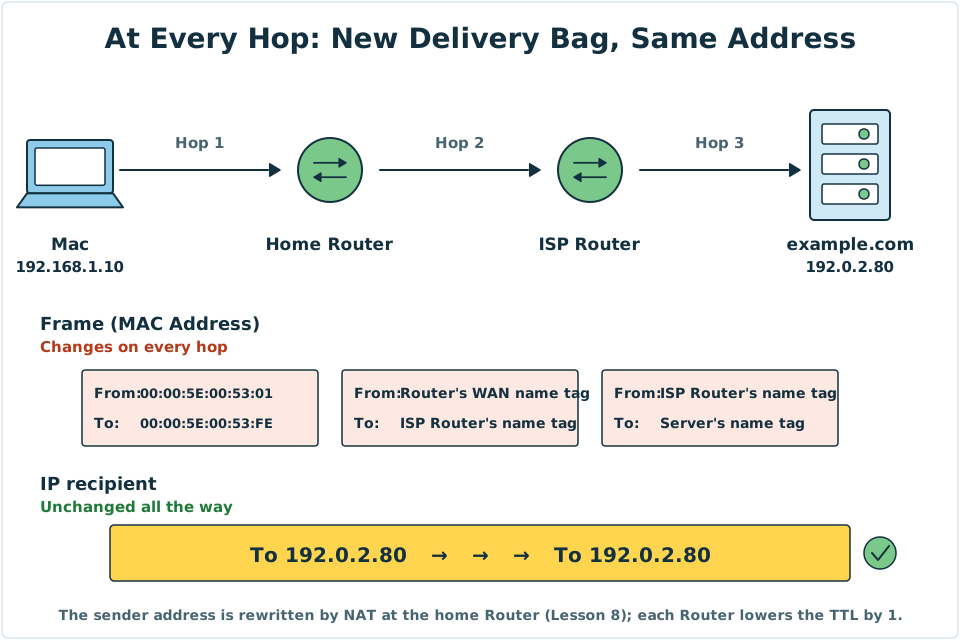
Diagram: Over the three segments of the journey, the MAC Address on the Frame is different on each segment, while the IP recipient in the backpack, 192.0.2.80, stays the same from start to finish.
Two details: Each time a Router forwards a packet, it subtracts 1 from the TTL (Time to Live) in the IP Header, so that a packet can't circle forever. A home Router also rewrites the sender address. This is called NAT (Network Address Translation), and Lesson 8 covers it.
The OSI Model: another way of layering
In textbooks or exams later on, you will meet another model with seven layers, the OSI Model. It is a reference model set out in the 1980s, and it splits things more finely. What really runs on the Internet is TCP/IP.
| TCP/IP Model (four layers) | OSI Model (seven layers) |
|---|---|
| Application Layer | 7 Application, 6 Presentation, 5 Session |
| Transport Layer | 4 Transport |
| Internet Layer | 3 Network |
| Link Layer | 2 Data Link, 1 Physical |
When people in the industry talk about "Layer 2" devices and "Layer 3" devices, such as a Switch and a Router, they are using the OSI Model's numbers. You will meet them again in the next lesson.
4. Try It Yourself
Mini game
Help Pip pack his backpack
Put the four wrappings below in order, from the innermost to the outermost.
- The IP Header, marked with the recipient 192.0.2.80
- A small piece of the photo (the Payload)
- The Frame Header, marked with the MAC Address
- The TCP Header, marked Port 443
Mini game
Which layer does this label belong to?
Sort the six cards below into the correct layer:
-
1
192.0.2.80 -
2
00:00:5E:00:53:01 -
3Port 443
-
4The text and pictures of a web page
-
5
192.168.1.10 -
6Port 53
All sorted correctly! From the inside out: content (Application) → Port (Transport) → IP Address (Internet) → MAC Address (Link).
Task: Work out how many Pips are needed
- Pick a photo in your phone's album and check its file size (iPhone: swipe up to see the info; Android: Details).
- Use this formula to estimate: file size (bytes) ÷ 1,460 ≈ number of packets. 1 MB is about 1,000,000 bytes.
- For example, for a 3 MB photo: 3,000,000 ÷ 1,460 ≈ 2,055 packets.
Think about it: a one-minute HD video can be tens of MB. How many Pips would have to set off?
5. Where the Analogy Breaks
- A packet is not a "person" walking the whole way. It looks as if Pip walks from start to finish. In fact every stop copies the signal and sends it out again, and what travels along the cable is only an electrical signal or light.
- The wrapping isn't a perfect set of layers. In the analogy, each layer fully wraps whatever is inside. But a Frame has a checksum at the end as well as its Header at the front, and some Header fields change on the way (for example, the TTL).
- The layers are not an iron rule. In the real world, some devices work "across layers". For example, when a home Router does NAT, it rewrites Port numbers, and Ports belong to the Transport Layer.
- Packets don't always arrive in order. The Pips may take different routes, and those who set off later may arrive first. Putting them back in the right order is the job of TCP (Transmission Control Protocol) in Lesson 9.
- The size is not fixed. 1,500 bytes is the most common upper limit on Ethernet. Other networks can differ, and a packet can be much smaller than the limit.
6. Quiz
7. Key Notes
- Data is cut into many small Packets. A common upper limit on Ethernet (the MTU) is 1,500 bytes.
- A packet is made of a Header and a Payload. The Header carries the delivery details, and the Payload is the real content.
- The TCP/IP Model has four layers: Application, Transport, Internet and Link. The OSI Model has seven layers and is used for reference.
- Wrapping layer after layer when sending is called Encapsulation. Unwrapping layer after layer when receiving is called Decapsulation.
- The MAC Address is replaced at every stop, and the IP recipient stays the same for the whole trip.
Next Stop
Pip has packed his backpack. But which devices change his delivery bags and show him the way along the route? And what is that blinking box at home really doing?