
1. Comic Opening
Comic text version (scenes and dialogue)
| Panel | Scene | Dialogue |
|---|---|---|
| 1 | Octo, Rue and a Wi-Fi antenna poke out of the home Router box. | Caption: "That blinking box at Mac's home turns out to be a whole squad." Pip: "So many people live in there!" Octo: "I look after the cables at home, Rue looks after the road out, and the antenna looks after Wi-Fi!" |
| 2 | Octo opens his notebook, the MAC Address Table, and sends the Frame into Port 2 only. | Caption: "A Switch reads the MAC Address and sends the letter to the right Port only." Octo: "Got it! Delivering to the right port right now!" |
| 3 | Mac broadcasts through a megaphone, and Rue raises her wing and answers with her name tag. | Caption: "Know only the IP Address but not the MAC Address? Shout it out with ARP." Mac: "Who is 192.168.1.1? Please tell me your name tag!"Rue: "That's me! My name tag is 00:00:5E:00:53:FE." |
| 4 | Rue stands in front of a door marked WAN, holding a map. Pip carries a backpack addressed to 192.0.2.80. |
Caption: "Going to another network? Hand it to a Router." Rue: " 192.0.2.80 isn't at home, so leave it to me! This way, this is the fastest route!" |
2. Key Idea
The network has a "squad", and each member has a different job:
- Hub: Shouts whatever it receives to everyone. It is rarely used now.
- Switch: Reads the MAC Address and sends data only to the right device within the same LAN (Local Area Network).
- Router: Reads the IP Address and sends data on to other networks.
- Access Point: Lets phones and other devices join the LAN over Wi-Fi.
The blinking box at home is usually several of these rolled into one.
3. A Closer Look
Want an animated walkthrough? Network Stories 1. Octo's First Day at Work: How a Switch Delivers and 3. Who Is 192.168.1.11? ARP (Address Resolution Protocol)
The squad at a glance
| Device | What it reads | Where it works | Industry name | Analogy |
|---|---|---|---|---|
| Hub | Nothing | Within one LAN | Layer 1 device | Someone shouting in a classroom |
| Switch | MAC Address | Within one LAN | Layer 2 device | Octo |
| Access Point | MAC Address | Connects Wi-Fi to the LAN | Layer 2 device | Octo who speaks radio |
| Router | IP Address | Between different networks | Layer 3 device | Rue (the post office) |
"Layer 1, 2 and 3" are the numbers of the OSI Model from the last lesson. Layer 1 is the physical signal, Layer 2 is the world of MAC Addresses, and Layer 3 is the world of IP Addresses.
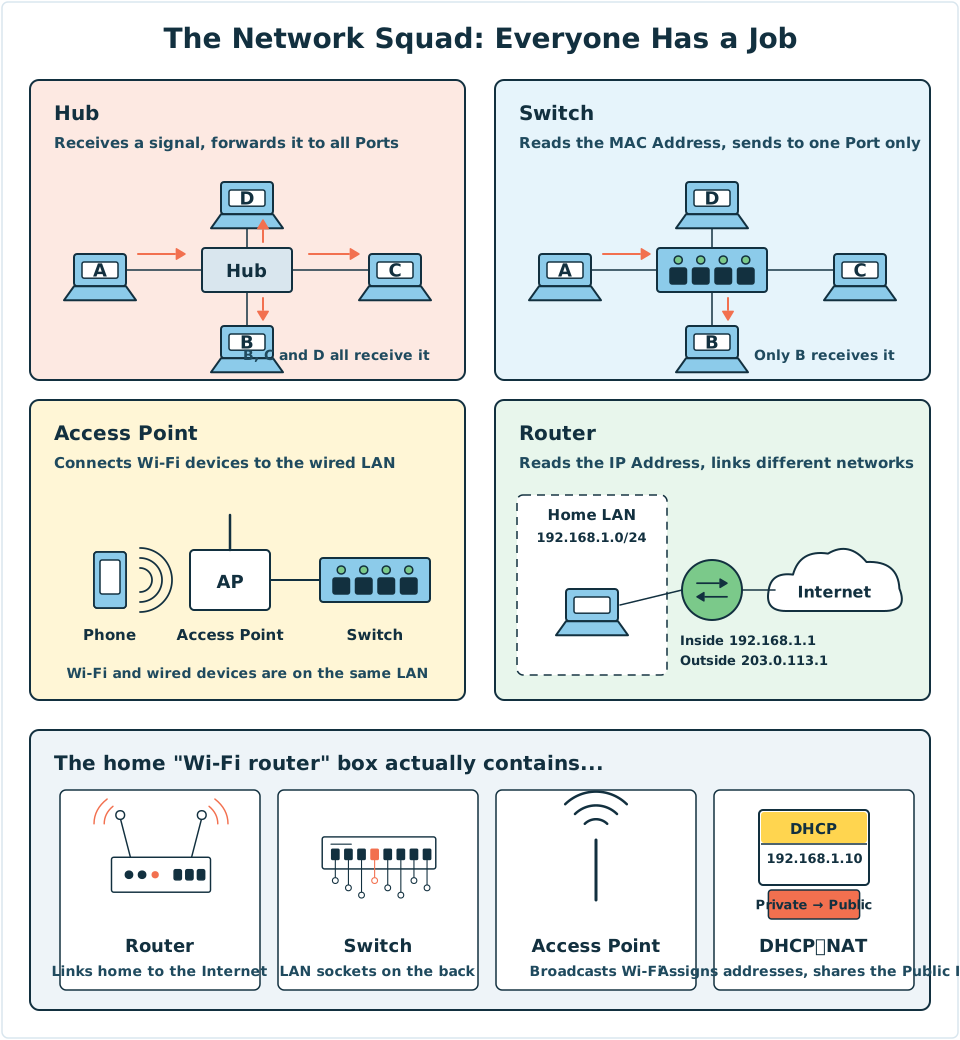
Diagram: The top half compares four kinds of device: a Hub forwards to all Ports, a Switch sends to just one Port, an Access Point links wireless to wired, and a Router connects two networks. The bottom half shows how the jobs are shared inside a home Router box.
Hub: Octo's predecessor
The Hub is a very early device. It doesn't read the recipient. When a signal comes in, it sends it out unchanged to all the other Ports.
The problem is that everyone shares the same "wire". If two computers speak at the same time, their signals crash into each other. This is called a Collision, and both sides have to wait a moment and send again. The more devices there are, the more collisions there are, and the slower the network gets.
Today Hubs have almost completely been replaced by Switches.
Switch: Octo's notebook
A Switch has many Ports, and each Port connects to one device. It keeps a notebook called the MAC Address Table, which records "which MAC Address is on which Port".
The Switch notebook at Mac's home might look like this:
| Port | MAC Address | Who it is |
|---|---|---|
| 1 | 00:00:5E:00:53:01 |
Mac's computer (192.168.1.10) |
| 2 | 00:00:5E:00:53:02 |
Another device at home (192.168.1.11) |
| 5 | 00:00:5E:00:53:FE |
Rue, the home Router (192.168.1.1) |
When Octo receives a Frame:
- Learn first: He reads the sender's MAC Address and notes down "this name tag is on this Port".
- Then deliver: He reads the recipient's MAC Address and checks the notebook.
- Found → he sends it to that one Port only.
- Not found, or the recipient is the Broadcast Address
FF:FF:FF:FF:FF:FF→ he sends it to every Port except the one it came from.
When a Switch starts up, its notebook is blank. Nobody has to set it up. It learns as it delivers.
Access Point: a Port without a cable
Phones and tablets have no socket for a network cable. They get online over Wi-Fi. An Access Point is the device that links radio signals to the wired LAN. The Wi-Fi name you see on your phone is called the SSID (Service Set Identifier).
An Access Point reads MAC Addresses just like a Switch, and it also works within one LAN. So phones on Wi-Fi and computers on cables can be in the same Subnet, for example both in 192.168.1.0/24.
Router: Rue's map
A Router stands between two or more networks. Each of its interfaces belongs to one network, so it has several IP Addresses.
It has a map called the Routing Table, which records "to reach this network, hand it to whom as the next stop". The map of a home Router is very simple:
| Destination network | How it is sent |
|---|---|
192.168.1.0/24 (the home LAN) |
Sent out directly on the LAN side |
Everywhere else (0.0.0.0/0) |
Handed over the WAN side to the ISP (Internet Service Provider) Router at 203.0.113.254 |
0.0.0.0/0 means "any address". This line is called the Default Route: if the map has no more precise road, take this one.
A Router has two more features:
- It does not forward a Broadcast to other networks, so a broadcast stays inside its own LAN.
- Each time it forwards a packet, it subtracts 1 from the TTL (Time to Live).
ARP: finding a MAC Address from an IP Address
When Mac wants to send data, he knows only the other side's IP Address, but the Frame needs a MAC Address. What can he do?
ARP (Address Resolution Protocol) is how you shout across the LAN:
- Mac broadcasts: "Who is
192.168.1.1? Please tell192.168.1.10." (The recipient isFF:FF:FF:FF:FF:FF.) - Every device on the LAN hears it, but only
192.168.1.1(Rue) replies: "That's me, and my MAC Address is00:00:5E:00:53:FE." (This time the reply goes straight to Mac, with no broadcast.) - Mac saves the answer in his ARP Cache, so he doesn't have to ask again next time.
Note: if the other side is on another network (for example, 192.0.2.80 for example.com), Mac will not ARP for 192.0.2.80. The other side is not on the LAN and could never hear him. Instead, Mac uses ARP to ask for the MAC Address of the Default Gateway 192.168.1.1 and hands the Frame to Rue.
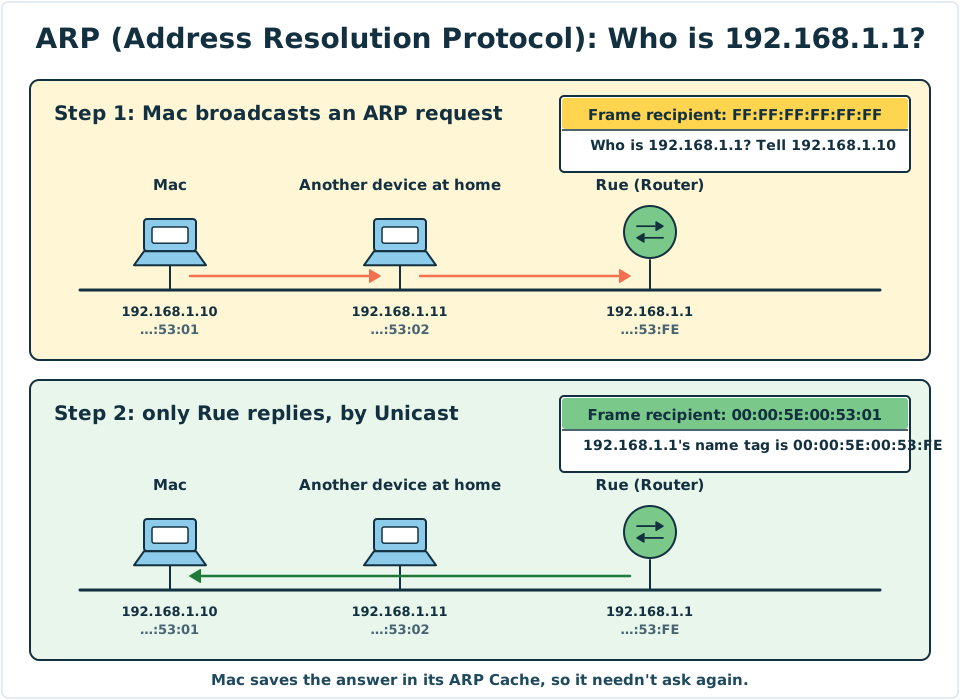
Diagram: In step 1, Mac broadcasts the ARP question to the whole LAN. In step 2, only Rue replies, using Unicast, and Mac saves the answer in his ARP Cache.
The blinking box at home
The "Wi-Fi router" at your home is really several devices rolled into one:
| Role inside the box | What it does |
|---|---|
| Router | Connects the home LAN to the Internet |
| Switch | The LAN cable sockets on the back of the box |
| Access Point | Sends out the Wi-Fi signal |
| DHCP (Dynamic Host Configuration Protocol) server, NAT (Network Address Translation) | Hands out addresses, and shares one Public IP (Lesson 8) |
On the back of the box there is usually one socket in a different colour, marked WAN or Internet, which connects to the ISP. The other sockets, marked LAN or 1, 2, 3, 4, are the Ports of the built-in Switch.
4. Try It Yourself
Task 1: Look at the box at home
- Find the Router at home (usually next to the TV or near the front door).
- Look at the sockets on the back. Which one is the WAN (or Internet) socket? How many LAN sockets are there?
- Look at the label on the bottom of the box. It usually shows the Wi-Fi name (SSID) and the MAC Address.
Safety tip: Don't photograph the Wi-Fi password or admin password on the label and post them online.
Task 2: Peek at your computer's ARP Cache
| System | Steps |
|---|---|
| Windows | Open "Command Prompt" and type arp -a |
| macOS | Open "Terminal" and type arp -a |
You will see a table with IP Addresses on the left and MAC Addresses on the right. Find your Default Gateway (the address you wrote down in the last lesson) and see what its MAC Address is.
A phone usually can't show you its ARP Cache directly, so this task needs a computer.
Mini game
Whose job is this?
Match the six cards below to the right device:
-
1Reads the MAC Address and sends the Frame to just one Port
-
2Shouts out any signal it receives to every Port
-
3Reads the IP Address and sends the packet on to another network
-
4Lets a phone join the LAN over Wi-Fi
-
5Looks up the Routing Table to decide the next stop
-
6Records the sender's MAC Address in its notebook while it delivers
All sorted correctly! A Hub sends everything to everyone. A Switch and an Access Point read MAC Addresses and work within a LAN. A Router reads IP Addresses and works between networks.
5. Where the Analogy Breaks
- Octo isn't a computer "thinking". A Switch looks up its table and forwards Frames using dedicated chips. It is extremely fast and can handle millions of Frames per second.
- A home box is different from professional equipment. Schools and companies usually keep Routers, Switches and Access Points as separate devices, and have many more of them.
- A Router's map isn't always drawn by hand. A home Router's map is very simple, but big Routers on the Internet swap information with each other and update their maps automatically (Network Story 13).
- ARP is used only with IPv4. IPv6 uses a different method called Neighbor Discovery to do the same job.
- The line between "Layer 2" and "Layer 3" isn't absolute. Some Switches can also do a Router's job, and they are called Layer 3 Switches.
6. Quiz
7. Key Notes
- A Hub forwards to every Port, which causes Collisions, and it has been phased out.
- A Switch reads the MAC Address and uses its MAC Address Table to deliver within one LAN. It learns automatically.
- An Access Point lets Wi-Fi devices join the LAN. A Router reads the IP Address and uses its Routing Table to forward between different networks.
- ARP broadcasts "who has this IP Address?" to find out the MAC Address. To reach another network, it asks for the MAC Address of the Default Gateway.
- The "Wi-Fi router" at home is one box combining a Router, a Switch, an Access Point and more.
Next Stop
Rue only knows how to read IP Addresses. But when you go online, you type example.com, not a string of numbers. Who turns the name into an address for you?