
1. Comic Opening
Comic text version (scenes and dialogue)
| Panel | Scene | Dialogue |
|---|---|---|
| 1 | Pip holds a letter addressed to example.com; Rue frowns at a signpost covered in numbers. |
Caption: "Mac typed example.com into the browser."Pip: "Rue, please deliver this to example.com!"Rue: "I only understand IP Addresses, and I don't know how to find this name..." |
| 2 | Dr. Lookup visits three counters: the Root Server, .com, and the authoritative server for example.com. |
Caption: "DNS (Domain Name System) starts at the master directory and asks its way down, level by level." Dr. Lookup: "Let me look that up..." Counters: "Go ask .com." "Go ask the authoritative server for example.com." "It's 192.0.2.80!" |
| 3 | Dr. Lookup hands over the answer card and clips a bookmark into his phone book: "TTL (Time to Live) 3600 seconds". | Dr. Lookup: "example.com is 192.0.2.80. I'll clip a bookmark, so if you ask again within an hour, it'll be quick!"Caption: "Answers that have been looked up are remembered for a while. This is called a Cache." |
| 4 | Mac asks again. Dr. Lookup flips straight to the bookmarked page and answers; Pip's backpack now reads 192.0.2.80 and Pip sets off. |
Caption: "The second time, he flips straight to the bookmarked page." Mac: "Where is example.com?"Dr. Lookup: "It's in my bookmarks: 192.0.2.80!"Pip: "Backpack on, let's go!" |
2. Key Idea
To find another computer, your computer needs an IP Address, such as 192.0.2.80. But people find names much easier to remember, such as example.com.
DNS (Domain Name System) is the system that turns a web address into an IP Address. It works like the Internet's phone book: you look up a name, and it gives you the number.
This phone book is not a single book kept in one place. It is shared out among many servers around the world, which work together to find the answer one level at a time.
3. A Closer Look
The structure of a web address: read from right to left
A name like www.example.com is called a Domain Name. It is made of several parts, and you read it from right to left. The further right a part is, the higher its level:
| Part | Example | Meaning |
|---|---|---|
| Root | The invisible "." at the far right | The master directory of the whole phone book |
| TLD (Top-Level Domain) | com |
A volume of the phone book, such as .com, .org or .hk |
| Second-level domain | example |
A name registered by an organisation or a person |
| Subdomain | www |
A name the domain owner creates under their own domain |
The full way to write it is actually www.example.com.. The final dot stands for the Root, and is usually left out.
The example addresses in this lesson In this lesson, we pretend that the server for
example.comis at192.0.2.80(and2001:db8::80for IPv6). Addresses starting with192.0.2.are reserved for teaching materials. Note that it starts with 192 but is not a Private IP. Only addresses starting with192.168.are.
Five roles: who is looking through the phone book?
| Role | Analogy | Job |
|---|---|---|
| Your device | The person who wants to make a call | Asks: "What is the number for example.com?" |
| Resolver | Dr. Lookup | Goes and asks, level by level, on your behalf, then tells you the answer |
| Root Server | The master directory | Doesn't know the answer, but knows who looks after each TLD volume |
| TLD server | A volume of the phone book | Knows which Authoritative Server is responsible for example.com |
| Authoritative Server | The person who answers the phone themselves | Keeps the official answer for example.com |
Which Resolver does your device use? Usually it is handed to you by DHCP (Dynamic Host Configuration Protocol) when you join a network (Lesson 8). At home it is often your Router at 192.168.1.1, which then passes the question on to the Resolver of your ISP (Internet Service Provider).
A complete lookup
Mac types example.com for the first time, and nobody has the answer remembered:
- Mac's computer asks the Resolver: "What is the IP Address of
example.com?" - The Resolver asks a Root Server. The Root Server replies: "I don't know, but these servers look after
.com. Go and ask them." - The Resolver asks the TLD server for
.com. It replies: "These Authoritative Servers look afterexample.com. Go and ask them." - The Resolver asks the Authoritative Server for
example.com. It replies: "example.comis192.0.2.80." - The Resolver hands the answer to Mac and saves it in its Cache.
The whole process usually takes only a few dozen milliseconds.
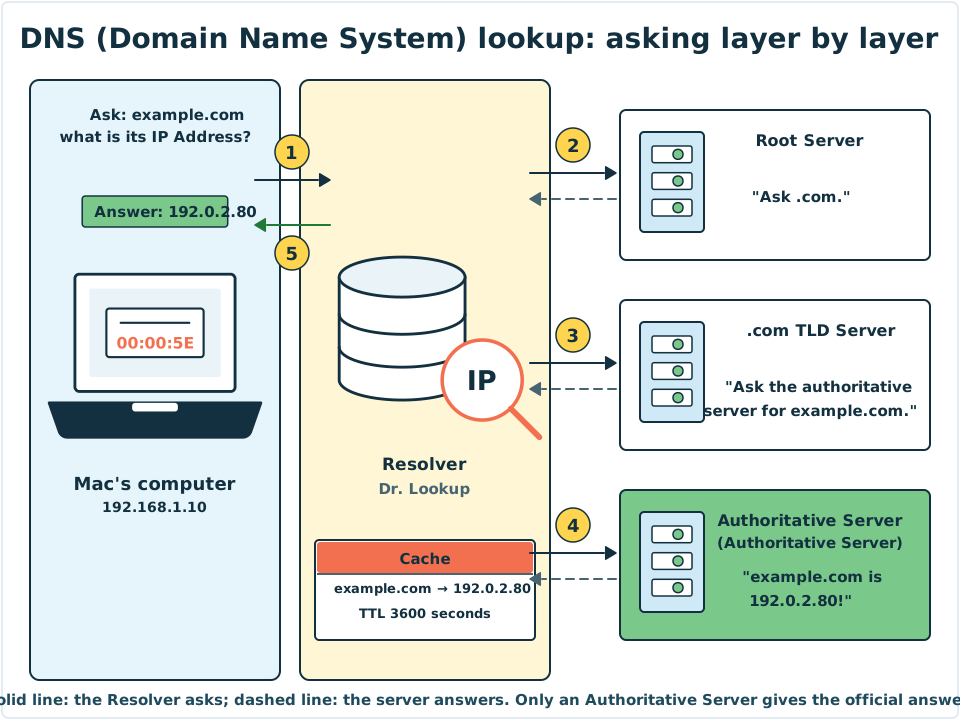
Diagram: Mac asks only once, and the Resolver (Dr. Lookup) walks through the three counters for him. The Root Server and the TLD server only "point the way". Only the Authoritative Server has the official answer.
Cache and TTL (Time to Live)
If every visit to a website needed all five steps, the Internet would be much slower. So everyone remembers answers for a while:
- Your browser and operating system remember them.
- The Resolver remembers them too, so other people using the same Resolver benefit as well.
- The Resolver also remembers "who looks after
.com", so next time it doesn't need to ask a Root Server.
How long are they remembered? Every answer comes with a TTL (Time to Live), measured in seconds. For example, a TTL of 3600 means the answer may be remembered for one hour, and after that it must be looked up again.
Lesson 5 covered the TTL of an IP Packet. The TTL of a DNS answer is something different: it means "how many seconds this answer may be cached". The two share a name but have different jobs.
What is written in the phone book?
Each entry is called a DNS Record. Common ones include:
| Record type | Meaning | Example |
|---|---|---|
| A Record | Name → IPv4 address | example.com → 192.0.2.80 |
| AAAA Record | Name → IPv6 address | example.com → 2001:db8::80 |
| CNAME Record | Name → another name (an alias) | www.example.com → example.com |
| MX Record | Which server handles email for this domain | Email for example.com → mail.example.com |
DNS queries are usually sent using UDP (User Datagram Protocol) on Port number 53. Lesson 9 explains what that means.
4. Try It Yourself
Task 1: Look it up yourself
On your computer, open Command Prompt (Windows) or Terminal (macOS) and type:
nslookup example.com
You will see two parts:
- Server / Address: the Resolver you are using. At home, it may well be your Router.
- Name / Address: the IP Address of
example.com. There may be both IPv4 and IPv6 addresses.
Note: The real
example.comis a demonstration website run by an Internet standards body, so the address you get will differ from the192.0.2.80we pretend in this lesson. That is normal. This lesson uses192.0.2.80so that it doesn't point to any real server.
Try looking up the same name twice. The second time is usually a little faster, because the answer is already in the Cache.
Task 2: What if there were no DNS?
On a piece of paper, write down the names of the three websites you visit most. Then ask yourself: if you had to remember their IP Addresses instead, could you? That is why DNS exists.
Mini activity: the right order for a lookup
Put the steps of a DNS lookup in the right order.
Mini activity: which kind of DNS record is it?
Sort the following five cards into the right record types:
example.com→192.0.2.80example.com→2001:db8::80www.example.com→example.com- Email for
example.comgoes tomail.example.com shop.example.com→192.0.2.81
See the answers
- A Record: 1 and 5. A name points to an IPv4 address.
- AAAA Record: 2. A name points to an IPv6 address.
- CNAME Record: 3. One name is an alias for another name.
- MX Record: 4. It names the email server.
5. Where the Analogy Breaks
- It is not one phone book, but a whole library. No single server in the world knows every answer. DNS is a system spread across the world, with each layer taking responsibility for its own part.
- One name can have many numbers. Big websites often have several IP Addresses, and people in different places may get different answers, so that everyone connects to a nearby server.
- Numbers can change, and old answers can go out of date. If a website moves to a new server, old answers in a Cache are only replaced once their TTL runs out.
- Dr. Lookup only looks up numbers. He doesn't deliver the mail. Once DNS has found the IP Address, the actual sending of data has nothing to do with DNS.
- Traditional DNS queries are not encrypted. Other people on the same network may be able to see which names you looked up. Encrypted ways of doing DNS lookups now exist, but not every device uses them by default.
6. Quiz
7. Key Notes
- DNS (Domain Name System) turns a Domain Name into an IP Address. It is the Internet's phone book.
- Read a web address from right to left: Root → TLD (Top-Level Domain, such as
.com) → second-level domain → subdomain. - The Resolver asks a Root Server, a TLD server and an Authoritative Server in turn on your behalf.
- Answers are saved in a Cache, and the TTL decides how long they are kept.
- An A Record points to IPv4 and an AAAA Record points to IPv6. DNS queries usually use UDP Port 53.
Next Stop
We keep saying that Mac's address is 192.168.1.10 and his Resolver is 192.168.1.1. But who gave him these settings? And with so many devices at home, how do they all share one Public IP to go out onto the Internet?