
1. Comic Opening
Comic text version (scenes and dialogue)
| Panel | Scene | Dialogue |
|---|---|---|
| 1 | Mac is home. His address card is blank (0.0.0.0) and he broadcasts through a megaphone. |
Caption: "Mac has just joined the Wi-Fi at home, and doesn't have an IP Address yet." Mac: "Can anyone give me an address?" |
| 2 | Rue sits at a hotel front desk and hands over a key card: 192.168.1.10, Default Gateway 192.168.1.1, DNS 192.168.1.1, lease of 24 hours. |
Caption: "DHCP (Dynamic Host Configuration Protocol) is like a hotel front desk handing out room key cards." Rue: "Here's 192.168.1.10 for you, rented for 24 hours. Come to me when you go out, and come to me when you need to look up a name!"Mac: "Thank you!" |
| 3 | Pip goes out past the management office. Rue changes the sender from 192.168.1.10 to 203.0.113.1 and writes down the match. |
Caption: "The whole household goes out sharing one Public IP. This is called NAT (Network Address Translation)." Rue: "Private room numbers can't be used out on the street, so I'll swap yours for the building's address, and make a note of it!" |
| 4 | Pip, returning with a reply, carries the recipient 203.0.113.1 Port 40001. Rue checks her record book and changes it back to 192.168.1.10. |
Caption: "The reply has arrived, and the management office passes it on according to the record." Rue: "Number 40001... that's Mac's! This way, this is the fastest route!" |
2. Key Idea
When a new device joins a network, it doesn't have an IP Address yet. DHCP (Dynamic Host Configuration Protocol) is the protocol that automatically hands out an IP Address and other settings. It works like a hotel front desk handing out room key cards: you check in, and the desk gives you a room number to use for a period of time.
Devices at home use Private IPs, which can't be used directly on the Internet. NAT (Network Address Translation) lets every device at home share one Public IP on the Router, a bit like a building's management office receiving and sending mail on behalf of all the residents.
3. A Closer Look
Want to see it animated? Network story 14. The Building Management Office: NAT and Port Forwarding
DHCP gives you more than an address
A single DHCP exchange gives you several settings you need to get online:
| Setting | What Mac gets at home | Purpose |
|---|---|---|
| IP Address | 192.168.1.10 |
Your address on this network |
| Subnet Mask | 255.255.255.0 (that is, /24) |
Tells you who is on the same Subnet as you |
| Default Gateway | 192.168.1.1 |
Who to go to when you leave the network (Lessons 4 and 6) |
| DNS server | 192.168.1.1 |
Who to ask when looking up a name (Lesson 7) |
| Lease Time | 24 hours | How long this address is lent to you |
At home, all of this is handled by your home Router. It is the DHCP server, the Default Gateway and the relay station for DNS, all in one.
Four steps: DORA
DHCP hands out an address in four steps. Take the first letter of each English word and you get DORA:
| Step | Name | Who speaks | What they say |
|---|---|---|---|
| 1 | Discover | Mac (broadcast) | "Is there a DHCP server out there? I need an address!" |
| 2 | Offer | Rue | "How about 192.168.1.10?" |
| 3 | Request | Mac (broadcast) | "I'll take 192.168.1.10!" |
| 4 | Acknowledge | Rue | "Approved! Rented for 24 hours." |
Why does step 1 use a broadcast? Because Mac doesn't have an IP Address yet, and doesn't know where the DHCP server is, so all he can do is shout to the whole LAN (Local Area Network). This time, the sender address is 0.0.0.0 ("I don't have an address yet"), and the recipient is 255.255.255.255 (IPv4 for "everyone on the same LAN"). The recipient on the Frame is the FF:FF:FF:FF:FF:FF from Lesson 3.
Why does step 3 broadcast again? Because there may be more than one DHCP server on a LAN, and several may have made an Offer. Mac announces loudly which one he has chosen, so the other servers know they can keep their addresses for somebody else.
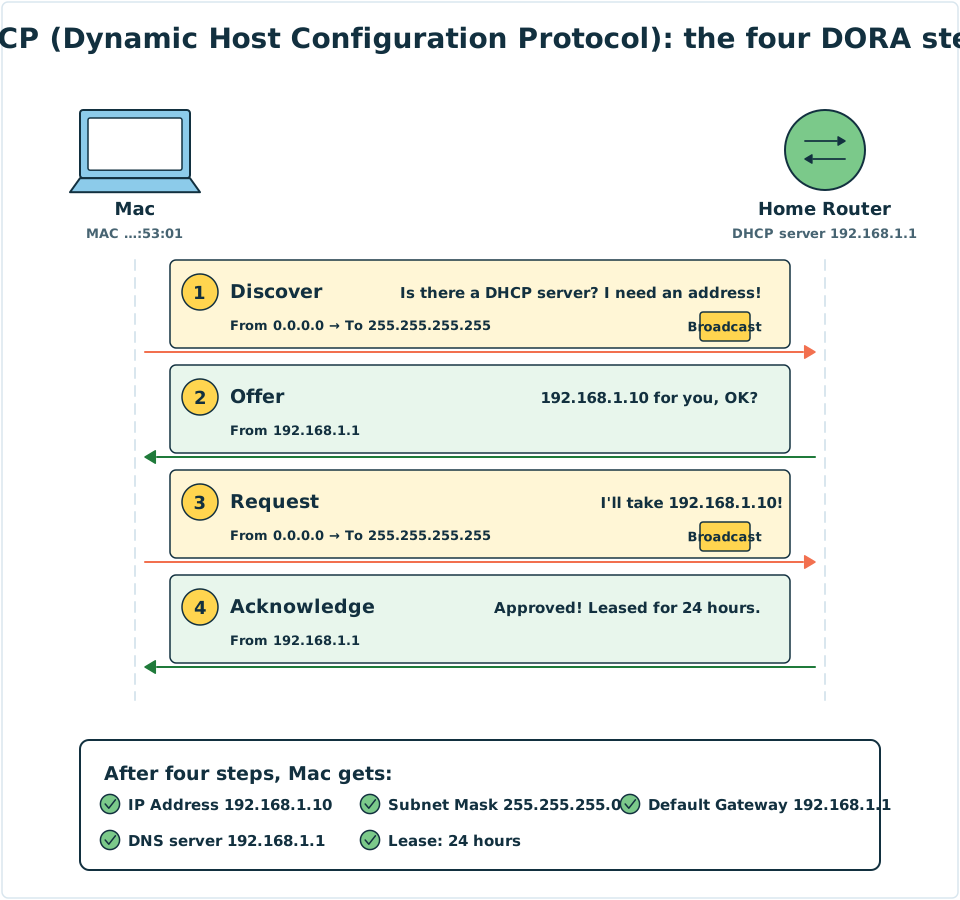
Diagram: Mac is on the left, and the home Router (the DHCP server) is on the right. Steps 1 and 3 use broadcasts. After the four steps, Mac has an IP Address, Subnet Mask, Default Gateway, DNS server and lease time.
A lease: borrowed, not given
A DHCP address is lent to you. When half of the lease time has passed, your device asks the Router whether it can renew. This is usually approved, so your address at home rarely changes.
If you leave (for example, by walking out with your phone), the address is taken back when the lease expires and given to another device. This is why Lesson 4 said that an IP Address can change even if you sit still.
What if no DHCP server can be found? Many systems pick an address starting with
169.254.for themselves. Such an address can only talk to devices on the same cable or Wi-Fi, and can't get online. If you see that your address starts with169.254, it usually means something has gone wrong with DHCP.
NAT: the building management office
Lesson 4 said that a Private IP never appears on the Internet. So how does Mac (192.168.1.10) visit example.com (192.0.2.80)?
The answer is that when a packet goes out, the home Router changes the sender to its own Public IP and makes a note of the match. With many devices at home, how can it tell whose reply is whose? The Router also rewrites the Port number (Lesson 9 covers Ports in detail), using a different number for each conversation.
Suppose Mac and another device at home both visit example.com at the same time. The Router's NAT record book might look like this:
| Device at home (Private) | After going out (Public) | The other side |
|---|---|---|
192.168.1.10, Port 50000 |
203.0.113.1, Port 40001 |
192.0.2.80, Port 443 |
192.168.1.11, Port 50000 |
203.0.113.1, Port 40002 |
192.0.2.80, Port 443 |
Both devices happened to use Port 50000, but once outside they became 40001 and 40002, so nothing gets mixed up.
When a reply arrives:
- The reply's recipient is
203.0.113.1, Port 40001. - The Router checks the record book: 40001 belongs to Port 50000 of
192.168.1.10. - The Router changes the recipient back to
192.168.1.10, Port 50000, and sends it into the home LAN.
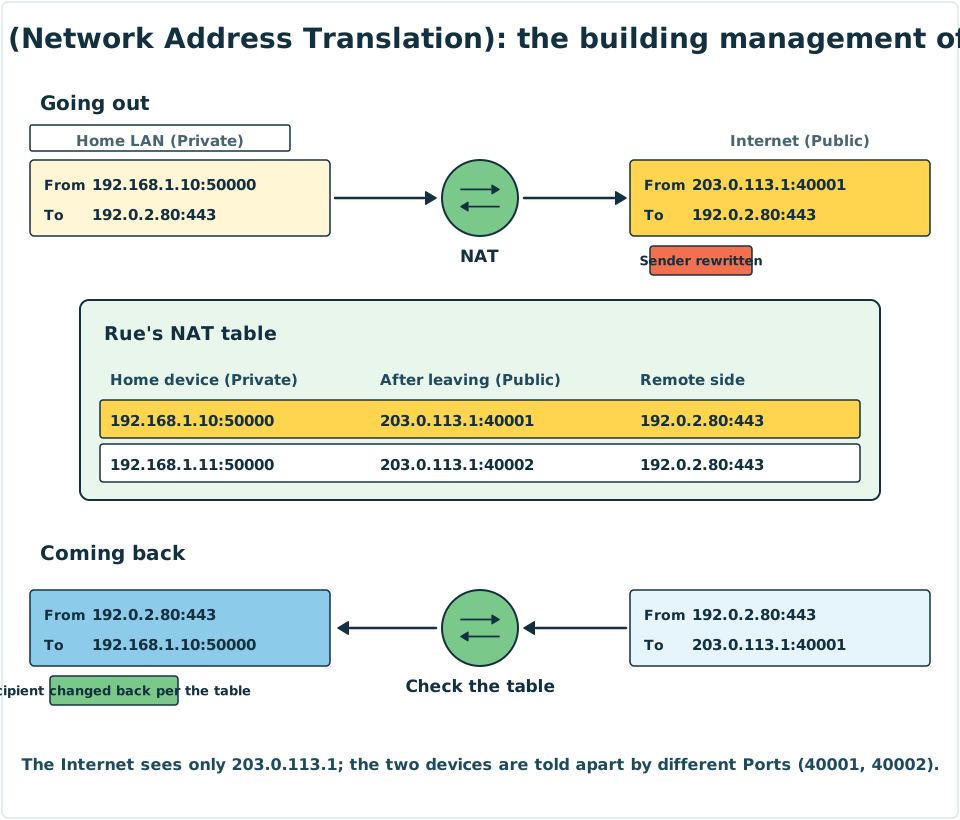
Diagram: the top half shows the outgoing packet, with its sender rewritten. The bottom half shows the returning packet, with its recipient changed back using the record book. The Internet only ever sees 203.0.113.1.
Strictly speaking, rewriting the Port as well is called PAT (Port Address Translation), and some people call it NAPT. When people talk about "NAT" on a home Router today, they almost always mean this.
A side effect of NAT: strangers can't find you
The record book only contains conversations that a device at home started. If someone on the Internet sends a message to 203.0.113.1 out of the blue, and the record book has no matching line, the Router doesn't know who to pass it to, and will usually just drop it.
- The good side: strangers can't reach the devices at home directly, which adds a layer of protection.
- The bad side: if you want to run a server at home, or play certain online games, you need to set up Port Forwarding on the Router. This writes down in advance "which device should get messages sent to a certain Port".
IPv6 has so many addresses that every device can have its own Public address, so NAT is generally not needed.
4. Try It Yourself
Task 1: Look at your lease
| System | Steps |
|---|---|
| Windows | In Command Prompt, type ipconfig /all and look for "Lease Obtained", "Lease Expires" and "DHCP Server" |
| macOS | System Settings → Network → Wi-Fi → Details → TCP/IP, and check whether "Configure IPv4" is set to "Using DHCP" |
| iPhone | Settings → Wi-Fi → ⓘ, and check whether "Configure IP" is set to "Automatic". At the bottom there is "Renew Lease" |
| Android | Wi-Fi network details → Advanced options → check whether IP settings is "DHCP" |
Think about this: is the address of your DHCP server the same as your Default Gateway?
Task 2: Compare two addresses
In Lesson 4 you found your own Private IP, and used a search engine to see your Public IP. Now you know why the two are different: your home Router is doing NAT.
Mini activity: the right order for DHCP
Put the four steps of DORA in the right order.
Mini activity: DHCP or NAT?
Sort the following six cards into the right function:
- A new device joins Wi-Fi and automatically gets
192.168.1.10 - As a packet goes out, the sender changes from
192.168.1.10to203.0.113.1 - Telling a device that its Default Gateway is
192.168.1.1 - When a reply arrives, using the record book to find out which device it belongs to
- Half of the lease has passed, so the device asks to renew
- Letting every device at home share one Public IP
See the answers
- DHCP (Dynamic Host Configuration Protocol): 1, 3 and 5. It hands out addresses and settings.
- NAT (Network Address Translation): 2, 4 and 6. It converts between Private IPs and Public IPs.
5. Where the Analogy Breaks
- A hotel front desk makes you "check out", but DHCP doesn't. In reality, a device that leaves may not tell the DHCP server. The server only takes the address back once the lease expires.
- Not every device uses DHCP. Routers, servers and printers often use fixed addresses that are set by hand. A Router can also be set so that a certain MAC Address always gets the same address.
- There may be more than one management office. Some ISPs don't have enough addresses and do NAT once more inside their own network, so the outside address of your Router may not be a true Public IP.
- NAT is not a Firewall. It makes you harder for strangers to find, but real security needs a Firewall (Network Story 19).
- Rue's record book expires. NAT records are deleted once a conversation ends or has gone unused for a while, so a reply can't arrive too late.
6. Quiz
7. Key Notes
- DHCP (Dynamic Host Configuration Protocol) automatically hands out an IP Address, Subnet Mask, Default Gateway, DNS server and lease time.
- The four DHCP steps are DORA: Discover, Offer, Request, Acknowledge. Discover and Request use broadcasts.
- Addresses are rented, and renewed when half of the lease has passed. An address starting with
169.254usually means no DHCP server could be found. - NAT (Network Address Translation) lets the whole household share one Public IP: it rewrites the sender and Port on the way out, and changes them back using the record book on the way in.
- People outside can't start a conversation with a device behind NAT, unless you set up Port Forwarding.
Next Stop
The NAT record book was full of Port numbers: 50000, 40001, 443... What exactly are they? And why does some data have to "shake hands first" before it is sent?