
1. Comic Opening
Comic text version (scenes and dialogue)
| Panel | Scene | Dialogue |
|---|---|---|
| 1 | The server building 192.0.2.80 has mailboxes 53, 80 and 443 by the door. Pip drops a letter into number 443. |
Caption: "One server offers many services at once. Each service has its own mailbox number, called a Port." Pip: "Does the web page need encryption? Then it's mailbox 443!" |
| 2 | Three speech bubbles between Mac and the server: SYN, SYN-ACK, ACK (acknowledgement). | Caption: "Before sending data, TCP (Transmission Control Protocol) does a three-way handshake." Mac: "Hello, can we start?" Server: "Hello, got it, we can!" Mac: "Great, let's begin!" |
| 3 | Three Pips set off carrying numbers 1, 2 and 3. Number 2 is lost. The server holds up a sign: "Got 1, please send 2 again!" A new number 2 sets off. | Caption: "TCP numbers every piece of data. If one goes missing, it is sent again." Pip: "Number 2 is lost? No problem, I'll run it again!" |
| 4 | Mac is on a video call. A stack of postcards flies out and one falls off. | Caption: "UDP (User Datagram Protocol) doesn't shake hands and doesn't resend. Speed is everything." Mac: "Missing one frame is no big deal, keep chatting!" |
2. Key Idea
A computer runs many programs at the same time. A Port is a number that tells different services apart on the same device. It works like mailbox numbers in a building: the IP Address finds the building, and the Port finds the mailbox.
There are two ways to send data:
- TCP (Transmission Control Protocol): shakes hands first, numbers the data and resends anything that goes missing. It guarantees the data arrives complete and in order, like registered mail.
- UDP (User Datagram Protocol): no handshake, just send it. It is fast but doesn't guarantee delivery, like a postcard.
3. A Closer Look
Port: the mailboxes in the building
An IP Address only gets a Packet to the right device. But the server 192.0.2.80 might be a web server and a DNS (Domain Name System) server at the same time. Which program should get the Packet? That depends on the Port.
A Port is a 16-bit number from 0 to 65535. Some common ones:
| Port | Service | TCP or UDP? |
|---|---|---|
| 53 | DNS (Domain Name System) | Mostly UDP |
| 67, 68 | DHCP (Dynamic Host Configuration Protocol) | UDP |
| 80 | HTTP (Hypertext Transfer Protocol), unencrypted web pages | TCP |
| 443 | HTTPS (HTTP Secure), encrypted web pages | TCP (the newer HTTP/3 uses UDP) |
An IP Address plus a Port says exactly "which service on which device". We write them joined by a colon, for example 192.0.2.80:443.
Lesson 7 said the server for
example.comuses192.0.2.80. The ending 80 happens to match the web Port 80, which may help you remember it. But they are different things: one is part of an IP Address, the other is a Port.
The sender has a Port too
It isn't only servers that have Ports. Your device has them too. When Mac opens example.com:
| IP Address | Port | |
|---|---|---|
| Sender (Mac) | 192.168.1.10 |
50000 (picked temporarily by the system) |
| Receiver (server) | 192.0.2.80 |
443 |
The server's Port is fixed, because everyone knows web pages live at 443. Mac's Port is picked temporarily by the system, usually between 49152 and 65535. When the server replies, it sends to 192.168.1.10:50000, and Mac's computer knows which browser tab to hand it to.
This is where the Port numbers in the NAT (Network Address Translation) notebook in Lesson 8 come from.
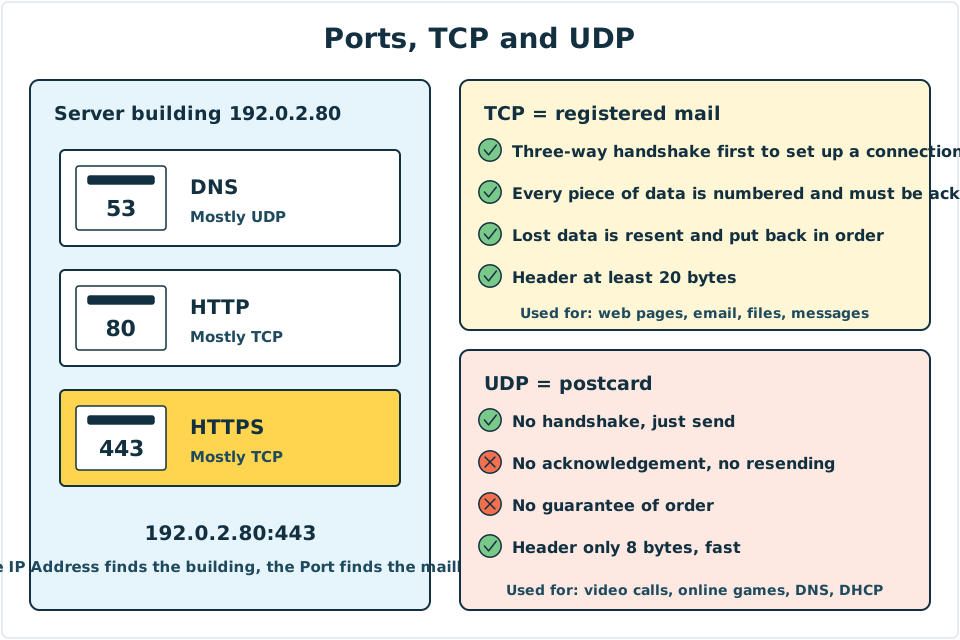
Diagram: on the left is the server building 192.0.2.80, and the mailboxes by the door are Ports. On the right, TCP (registered mail) and UDP (postcard) are compared.
TCP step one: the Three-way Handshake
Before TCP sends data, both sides set up a "connection" to make sure everyone is ready. It takes three steps, called the Three-way Handshake:
| Step | Name | Who speaks | Meaning |
|---|---|---|---|
| 1 | SYN | Mac → server | "Hello, I'd like to start. My numbering begins here." |
| 2 | SYN-ACK | server → Mac | "Hello, I got your numbering. My numbering begins here." |
| 3 | ACK | Mac → server | "Got it, let's begin!" |
Only after all three steps do the two sides start sending real data. When the conversation is over, they use a FIN message to say goodbye and close the connection.
How does TCP "guarantee delivery"?
- Numbering: TCP gives every piece of data a Sequence Number.
- Acknowledgement: when the receiver gets data, it replies with an ACK, meaning "I've received everything up to here, please send the next piece".
- Resending: if the sender waits a while and no ACK arrives, it knows the data may have been lost and sends it again.
- Ordering: Packets may take different routes and arrive out of order. The receiver uses the numbers to put them back in the right order before handing them to the program.
So a program that uses TCP doesn't need to worry about lost or jumbled data. TCP has already handled it.
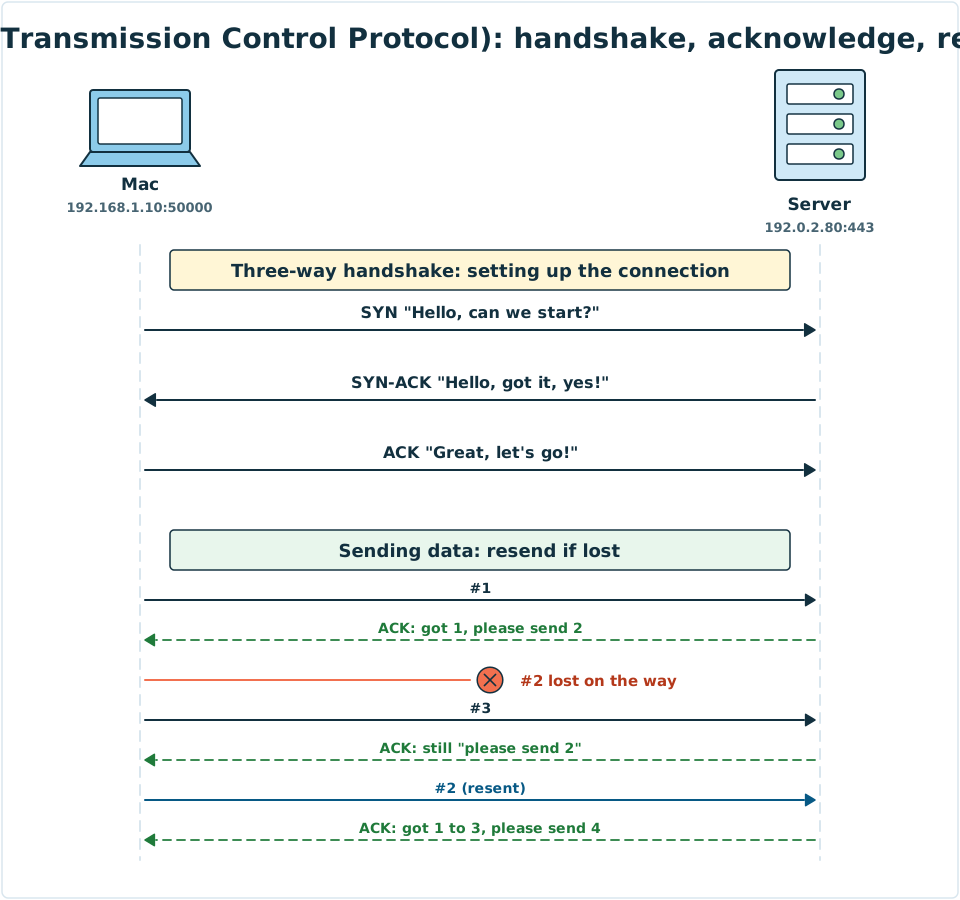
Diagram: the top half is the three-way handshake SYN, SYN-ACK, ACK. The bottom half is data transfer: Packet 2 is lost, the receiver keeps replying "please send 2", and the sender resends Packet 2.
UDP: send it and forget it
UDP has no handshake, no numbering or acknowledgement, and no resending. It adds just one very small Header with the Port numbers, and sends the data off. This Header is only 8 Bytes, while TCP needs at least 20 Bytes.
That may sound careless, but sometimes fast matters more than complete:
- Video calls and online games: if one frame is missing, the next one arrives very soon. Stopping to wait for a resend would make the picture freeze.
- DNS queries: the question and the answer are both short, and one round trip finishes the job. It isn't worth a three-way handshake first. If no answer comes back, the program simply asks again.
- DHCP: the device doesn't have an IP Address yet, so it can't set up a proper connection.
Comparing the two
| TCP (Transmission Control Protocol) | UDP (User Datagram Protocol) | |
|---|---|---|
| Analogy | Registered mail | Postcard |
| Sets up a connection first | Yes, a three-way handshake | No |
| Guarantees delivery | Yes, lost data is resent | No guarantee |
| Guarantees order | Yes | No guarantee |
| Header size | At least 20 Bytes | 8 Bytes |
| Speed | Slower, waits for acknowledgements | Faster |
| Common uses | Web pages, email, file transfers, instant messages | Video calls, online games, DNS, DHCP |
Back to our opening question. When you send a message, not a single word can be missing, so it uses TCP. On a video call, smooth matters more than perfect, so it mostly uses UDP. As for watching videos online, many platforms use TCP, and some use newer technology built on top of UDP. Each has its trade-offs.
4. Try It Yourself
Task 1: See the Ports your computer is using
On your computer, open Command Prompt (Windows) or Terminal (macOS). First open a few websites in your browser, then type:
netstat -an
You will see many lines, each one a conversation. Look for lines ending in :443 or .443. Those are the HTTPS websites you are connected to. The word ESTABLISHED beside them means the TCP handshake is done and the connection is set up.
It's fine if you can't understand everything on screen. Finding 443 is already a great result.
Mini activity: the order of the TCP three-way handshake
Put the three steps TCP uses to set up a connection in the right order.
Mini activity: TCP or UDP?
For each of these six uses, which one fits best?
- Downloading a phone app
- Video calling a friend
- Sending an email
- Playing a multiplayer online shooting game
- Looking up the IP Address of
example.com - Making a transfer in online banking
See the answers
- TCP: 1, 3, 6. Not a single Byte of the data can be wrong or missing.
- UDP: 2, 4, 5. Speed matters. A small loss can be ignored, or the program can simply ask again.
5. Where the Analogy Breaks
- Registered mail is not truly "guaranteed" to arrive. If the cable is cut, TCP can't deliver either. Its promise is that any data that does arrive is complete and in order, and that it tells the program about an error when delivery fails.
- Postcards don't always get lost. Most UDP Packets actually arrive just fine. UDP itself just doesn't take care of checking or resending.
- A handshake is more than a greeting. During the three-way handshake, the two sides exchange things like their starting Sequence Numbers, preparing for later acknowledgements and resending.
- You can add features on top of UDP. Some newer technologies, such as QUIC used by HTTP/3, are built on UDP and add their own numbering and resending, getting both speed and reliability.
- Port numbers are not "mandatory". 443 is a convention. A server can offer web pages on other Ports too, but browsers look at 443 by default.
6. Quiz
7. Key Notes
- A Port is a number from 0 to 65535 that tells apart different services on the same device. An IP Address plus a Port is written like
192.0.2.80:443. - Common Ports: 53 is DNS, 80 is HTTP and 443 is HTTPS. Your own device picks a temporary Port as the sender.
- TCP (Transmission Control Protocol) first sets up a connection with the Three-way Handshake (SYN, SYN-ACK, ACK). It then uses numbering, acknowledgements and resending to keep data complete and in order.
- UDP (User Datagram Protocol) has no handshake and no resending. Its Header is only 8 Bytes, and it suits uses where speed matters.
- Need it complete? Use TCP. Need it fast? Use UDP.
Next Stop
You now know all the characters and their jobs. In the final lesson, we connect everything together: from the moment you press Enter to the web page appearing, what really happens in between?